Home Blog Page 136

Apple Finally Released iPadOS 16

iPadOS 16

Apple always released iPadOS at the same time as iOS. However, due to the time required to adjust new features, the official major version update of the OS was delayed by a month. However, today, Apple has finally released iPadOS 16 as iPadOS 16.1 alongside iOS 16.1 with new functions and various improvements and fixes.

iPadOS 16.1 includes a number of changes for iPad users, including the new multitasking feature Stage Manager, which also contributed to the delay.

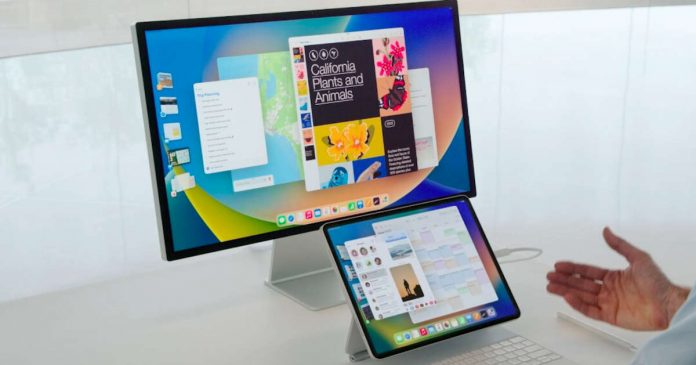
Stage Manager introduced in iPadOS 16.1

The biggest change in iPadOS 16 is the new multitasking feature, Stage Manager. This feature brings an entirely new windowing system to the iPad. Users can create different “stages” with different-sized windows for multiple applications and easily switch between them.

In a future iPadOS 16 version, Stage Manager will also add support for external monitors for iPad. However, this feature is limited to the iPad Pro M1 (and now M2) models only.

Other changes in iPadOS 16.1

In addition to the Stages Manager, iPadOS 16.1 adds several new iOS 16 features and some iPad-specific tweaks.

  • Message app update. Edit, unsend message, mark as unread, etc.
  • Mail app update. Undo sends, rich link, schedule send, etc.
  • Display scaling. A new display scaling setting increases the pixel density of your display, letting you see more in your applications.
  • iPad weather app
  • All-New Home Application
  • A desktop-class application with customizable toolbars, new context menus, find and replace, multi-select context menus, and more.

iPadOS 16 is available on all iPad Pro models, iPad Air 3rd generation and later, iPad 5 and later, and iPad 5 mini and later. You can update by going to Settings>General>Software Update.

4 Out Of 10 PCs Are Still Incompatible With Windows 11

adoption rate of Windows 11

On October 5th 2021, Microsoft announced the arrival of the next-generation operating system, Windows 11. At that time, the new version of the operating system brought a new “Start” menu and taskbar, powerful cloud and Microsoft 365 functions, as well as the Widgets function and Windows PC gaming experience, which attracted the attention of countless users for a while. 

However, one year later, the adoption rate of Windows 11 is not as much as imagined, and many people still mainly stay on Windows 10. The main reason that hinders their upgrade is the requirements set by Microsoft, which discourages them.

Users locked out of Windows 11

On average, only 57.26% of PCs are eligible for automatic Windows 11 updates, and more than 40% of devices are not eligible.

Microsoft specifies that the minimum hardware configuration for installing Windows 11 fulfil the three main levels:

  • System firmware: must support UEFI Secure Boot
  • TPM: Trusted Platform Module (TPM) version 2.0
  • Newer CPU(Intel 8th Gen Coffee Lake or Zen 2 CPUs) and at least 4Gb RAM and 64GB hard drive space

Although many developers have strained their brains, such as launching installation scripts to circumvent these limitations, this is not a long-term solution. Furthermore, the installation process makes it hard for people who are not extremely tech-savvy to utilise it.

It is worth mentioning that last year, according to The Verge, Microsoft revealed to it that computers that do not meet the above requirements could manually install Windows 11, but Windows Update will not automatically update the system for users. Microsoft has released an iterative version, and customers must manually download and install the file. Daily use may be unaffected, but updating the version is time-consuming and risky.

Some people may say that manual installation is also fine. However, this has little influence on individual users. Still, for IT teams who manage IT assets in large corporations, every time Microsoft issues a new version, it would be a tremendous task to install it manually on each machine.

At present, according to the detailed data from Lansweeper’s latest survey on an estimated 30 million Windows devices from 60,000 enterprises indicates that, on average, just 57.26% of workstations are qualified for the automatic update, while the remainder is not, while 42.74% do not meet the hardware requirements for Windows 11.

Additionally, while the majority of devices (92.85%) passed the memory test, about 65% of the TPM configurations of the test PCs met the requirements. In comparison, nearly 15% failed, and 20% were TPM-incompatible or not enabled.

How many devices fulfil the TPM system requirements of Windows 11?

In addition to the above-mentioned, Lansweeper also investigates the use of workstations and servers.

Compared with physical servers, the application of virtual servers to Windows 11 is not optimistic. The compatibility of the virtual server’s CPU is significantly lower, at 55.7%. Also, only 67.1% have enough memory. Even fewer are TPM 2.0 compliant, with only 1.33% of virtual workstations having TPM 2.0 enabled.

Only 2.35% of TPMs on physical servers passed the test. This means that if Microsoft creates a server OS with similar requirements in the future, about 97% of people will not be able to upgrade. For virtual servers, few servers support TPM.

Windows 11 distribution

However, compared with 2021, this data has shown signs of improvement. Among them, devices that meet the requirements of CPU and TPM increased by 12%, and devices that meet the requirements of memory increased by 1.8%. If this trend continues, all devices should potentially be Windows 11 compatible by 2026.

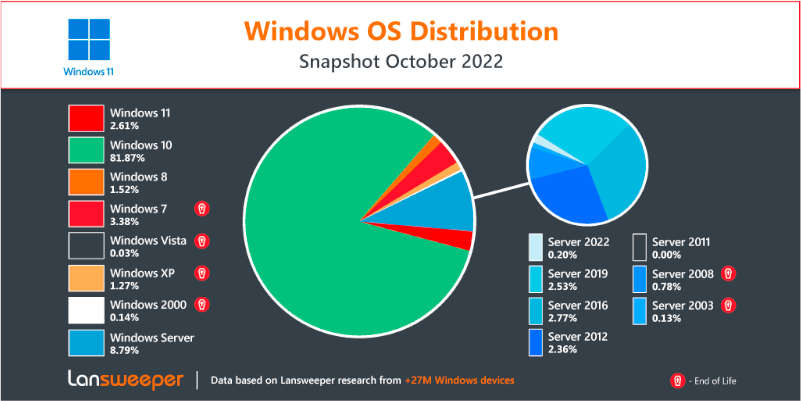
Lansweeper also conducted a survey. Since April 2022, the number of Windows 11 users has only increased by 1.17%, accounting for 2.61%. For now, Windows 10 is the most popular, with 81.87%, far ahead.

However, according to this study, the adoption rate of Windows 11 (1.27%) topped Windows XP (1.27%) but was still lower than that of Windows 7 (3.38%).

Windows 11 is expected to provide a variety of new features and advantages to users, such as an updated user interface, support for efficient multitasking, improved gaming and productivity programmes, and more. So get ready with a PC that fits the requirements of Windows 11.

Top Mobile App Development Trends to Watch

Mobile App Development Trends

Mobile-first solutions have become increasingly common across all industries, partly due to the global pandemic. Today’s smartphones are used to pay bills, talk with coworkers via messenger apps, and find new friends, which has led to a growing demand for high-quality mobile apps.

Mobile app revenue is expected to grow at a CAGR of 6.58% from 2022 to 2026, totaling $542.80 billion. Read on about the top Android app development trends to watch out for if you want to stay ahead of the curve in this fast-paced market.

Machine Learning and Artificial Intelligence

Machine learning (ML) can significantly reduce the time it takes to develop apps. In addition to streamlining app development, artificial intelligence (AI) and ML minimize errors made by humans when creating apps.

Furthermore, many currently available mobile apps utilize chatbots to allow consumers to customize certain aspects of their orders via an AI component. Over the next ten years, AI-powered apps will become increasingly prevalent in major industries like healthcare and retail.

5G

5G marked the beginning of the fourth industrial revolution. Fifth-generation cellular networks will be faster and more reliable than ever before. With speeds up to 10 times faster and latency 50% lower than 4G, 5G will facilitate IoT, self-driving cars, AR/VR, and more.

Apps in the future will utilize these capabilities for tasks we never imagined possible.

Additionally, mobile apps with 5G will be able to geo-target and geofence more precisely due to 5G’s higher radio frequency and shorter wavelength. In addition to optimizing mobile streaming and app functionality, the fifth-generation mobile network enables mobile app development companies to include additional features without adversely impacting performance.

Chatbots

Chatbots work around the clock. That means any e-commerce store or service provider can theoretically have 24/7 customer support without the inconvenience of night shifts. The use of chatbots is already widespread and essential for developing Android and iOS apps. 

Many online stores use chatbot apps to replace customer service since they provide quicker client responses. A combination of ML, AI, and natural language processing (NLP) will make chatbots even more efficient in the future.

By utilizing tools such as facial and voice recognition, semantic search, and sentiment analysis, bots will be able to communicate more naturally, and there might come a time when customers find it difficult to differentiate between a chatbot and a flesh-and-blood customer service representative.

VR/AR

Despite its widely documented adverse effect on the world, COVID-19 has positively impacted many industries since 2020. One of these industries is virtual/augmented reality. 

During the lockdown, the use of AR and VR has skyrocketed, not only in entertainment but also in business and industry, with some manufacturing firms even creating virtual production lines. This has led to a paradoxical growth in productivity and a reduction in operational costs despite the global pandemic.

Virtual and augmented reality will continue to have a positive impact on sales as well. A new generation of mobile AR/VR apps allows sales personnel to interact more directly with customers. Moreover, we expect EdTech apps to become more exciting and engaging in the coming years, enhancing learning opportunities.

Cloud Computing

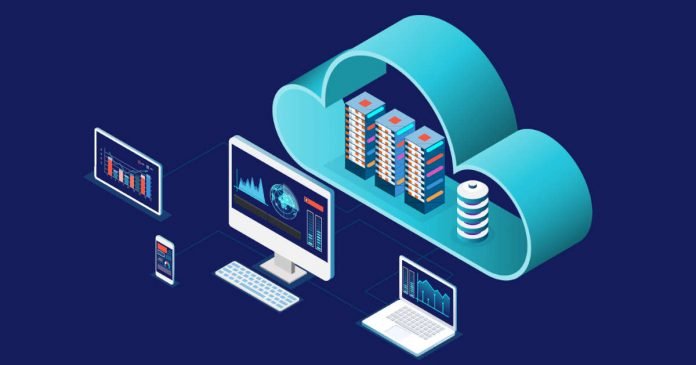
Mobile app development can benefit significantly from cloud computing. The need to develop apps for multiple platforms and smartphones has disappeared. Web browser-based applications that utilize cloud computing solutions work seamlessly across multiple platforms.

Smartphones do not require extra space to store the data. Everything is stored on a server and accessible via the internet. Cloud-based apps allow users to utilize their smartphone’s storage space for other purposes. All the information and crucial data are stored on the server, accessible from anywhere at any time.

Because the app is run on a server, there is little chance of data loss due to crashes.

Closing Thoughts

In today’s smartphone-driven world, global enterprises strive to provide customers with a unique mobile app experience. The mobile app development trends outlined in this article will undoubtedly improve business strategies and create tremendous growth in the near future.

To stay ahead in the competitive market, businesses can avail of cost-effective mobile app solutions from leading mobile app development companies and make a significant impact in today’s tech-driven world.

A Single Photonic Chip That Can Achieve A Speed Of 1.84 Pbit/s

Single Photonic Chip speed

Scientists at the Technical University of Denmark (TDU) in Copenhagen used a single photonic chip connected by a single fibre optic cable to deliver 1.84 Pbit/s(petabits per second) between two points 7.9 km apart, and the data transfer was successful. 

The current average bandwidth of the internet around the world is estimated to be 1 Pbit/s at all times. This new technology enables the transfer of volumes that exceed the amount of data transferred over the internet.

You probably can’t imagine how fast 1.84Pbit/s is. Internet that is currently in general use, speed of probably hundreds of Mbits per second is present or at 1Gbit, and recently it has reached up to 10Gbit, but 1Pbit is 1 million GBit. This is more than 20 times faster than ESnet6 (46 Tbit/s), an upgraded version of the science network used by NASA and others.

Photonic chip technology has great potential for optical data transfer, as both the processor and the transfer medium operate on light waves.

First, the data stream used in the experiment was split into 37 lines, each sent over a different optical fibre in the cable. The 37 data lines are divided into 223 data chunks, each corresponding to a zone of the optical spectrum. It enabled a ” frequency comb” to transmit data in different colours simultaneously without interfering with other streams. In other words, a massively parallel space/wavelength multiplexed data transmission system was completed.

It wasn’t easy to verify the bandwidth of 1.84Pbit/s because computers cannot send, receive, or store such a huge amount of data. So, the research team used dummy data on individual channels to verify the actual bandwidth.

The photonic chip requires processing to split a single laser into many frequencies and encode optical data into each of the 37 optical fibre streams. According to a Researcher in the team, it should be possible to build a sophisticated and fully functional light processor about the size of a matchbox. It is similar in size to current monochromatic laser transmitters used in the telecommunications industry.

Replacing the matchbox-sized optical data encoder/decoder with a photonic chip-equipped device of the same size while maintaining the fibre optic cable infrastructure is surprisingly capable of increasing the data bandwidth by a factor of 8,251 compared to the current level. It’s a good result. The researchers say there is potential enough to prompt a shift in future communications system design.

And the potential of the new chip doesn’t stop there. Using computational models, the researchers measured the system’s data-transmission capability, resulting in an eye-popping speed of up to 100 Pbit/s.

Elon Musk Plans To Fire 75% Of Twitter Employees

Elon Musk the boss

According to Washington Post sources, Elon Musk could put 75% of Twitter employees on the line. Currently, Twitter has around 7,500 people in its workforce so the layoffs could affect over 5600. 

In acquiring Twitter after months of twists and turns, Musk would have expressed this willingness to potential investors, justifying it with the need to reduce costs.

According to the extension recently obtained, Musk must close the Twitter purchase by October 28th. Behind the scenes, it appears that things are fitting together — not only have some sources confirmed this to the Washington Post, but Bloomberg reports that Twitter has frozen its employees’ stock premiums, a sign of an imminent change of scenery.

The extent of the cuts circulating during these hours is striking, but a staff reduction was already on the horizon before Musk’s offer. The Twitter leaders planned to cut almost a quarter of the workforce (about 1900 layoffs) to lower the payroll of 800 million dollars.

According to Edwin Chen, a data scientist in charge of spam and other Twitter metrics, massive layoffs could have “unimaginable” effects – they could affect the social network’s security, exposing it more easily to data leaks. 

To facilitate the reduction of staff, rumours say that Musk plans to implement the so-called “stack ranking”, a somewhat controversial employee performance ranking system. Abandoned by Microsoft in 2013, it unleashes fierce competition toxic environment within the companies in which it is implemented.

While we wait for Musk to complete the $44 billion acquisition of Twitter and demonstrate his vision for the future social network, it is important to remember that the owner of Tesla and SpaceX is notoriously vague in his intentions and statements, so the 75% employee cut may be nothing more than a number pulled out of a hat to impress some investors. 

It is not, in fact, the only prediction in freedom of Musk — in the past, he has stated that he aims to double the turnover of Twitter in three years but has never explained how he intends to do it.

Oracle Announces Oracle Alloy: Making It Easier To Deliver Its Services To The Cloud

cloud infrastructure platform

Oracle announced a new cloud infrastructure platform, Oracle Alloy.

Oracle Alloy is a platform that enables service providers, integrators, independent software vendors (ISVs), as well as organizations such as financial institutions and telecommunications providers, to offer new cloud services to their customers as cloud providers. By using Oracle Alloy independently in its data centre, it is also possible to control operations to meet specific regulatory requirements.

Oracle Alloy enables service providers, integrators, and ISV partners of Oracle Cloud Infrastructure (OCI) to control contract terms, customer relationships, touchpoints, etc., while maintaining specific industry, market, regulatory and governmental requirements. It is also possible to provide customized applications and services under your brand’s cloud regulations.

You can set your pricing structure, rate cards, account types and discount schedules and define your support structure and service levels. In addition, since the financial management function provided by Oracle Fusion Cloud ERP is built in, it is possible to manage the entire customer lifecycle, including invoicing and billing.

Key UX/UI Design Tips to Optimize Your Web App

Key UX UI Design Tips

Creating a web application that is both visually appealing and easy to use will ensure customer satisfaction. The user interface of your app is the part of your product that will be most visible to users. It should be carefully designed and meticulously tested to ensure that it’s ideal for its intended audience.

As a web developer, you’ll have many different tools available when creating the user interface for an application, including frameworks, libraries, and platforms. Some of the most popular are Angular, React, and Bootstrap. Each of these tools has its own strengths and weaknesses, but it is also essential to think about the user experience of your future project.

Designing the Best Web App

There are many valuable tips and best practices that can help improve the user experience (UX) and user interface (UI) of your web app, ensuring it is easy for users to interact with and navigate. With Yellow Systems – software development services company, the whole process is simple and understandable. And you won’t need to waste your time to receive the best result possible.

Think carefully about the layout of your web app

This should be designed in a way that is intuitive for the target audience of your application, and that makes it easy for visitors to find what they’re looking for. Consider using a grid-based layout or card-style design to help organize content in a way that is visually appealing and easy to scan.

It might be helpful to find out more about your target audience and their expectations. This might significantly influence your choice of layout and features to add to the app. It is evident that even though there might be a certain style and similarity among various apps, each niche requires certain elements and components.

Use clear, consistent visual elements

This can include colors, fonts, iconography, and other elements that are used throughout your app. These visual cues can help to create a more cohesive user experience, making it easier for users to find what they’re looking for.

In addition to using consistent visual elements, it is also important to make sure that the basic functionalities of your app are easy to find and intuitively laid out. This will help reduce confusion and frustration for users, ensuring that they can quickly and easily interact with your app.

Key UX UI Design Tips 2

Research your competitors and take inspiration from them

Learning from the successes and mistakes of other web developers can be a great way to improve your own app. Take some time to research popular apps in your niche, and identify their main features, including both their strengths and weaknesses in terms of UX/UI.

When designing your web app, it is also critical to keep the end users in mind. This will help you create a product that is appealing and useful for your target audience, as well as one that they are likely to keep returning to time and time again.

Seek flow in the user journey

Creating a smooth and streamlined user journey throughout your app is crucial for improving user engagement and retention. This can be accomplished by paying close attention to the micro-interactions that occur within the app, from tappable elements to interface animations. By focusing on flow in the user journey, you can create an engaging experience that visitors will want to come back to again and again.

Don’t overthink things

It’s easy to get caught up in the details and overthink your web app. However, this can often lead to features that aren’t really necessary or well-thought-out, which will only end up complicating the process of designing and building your product.

Employing web app design patterns that have been proven to work can be helpful. By taking a more minimalist approach to app design and focusing on the core features that will be most useful for your users, you can create an effective and intuitive product without getting bogged down in unnecessary details.

Final Say

To succeed with your web app, it is essential to take user experience and user interface into consideration at every step of the design process. As a web developer, it can be exciting and challenging to create the perfect user interface for your next web app. By paying careful attention to the layout, visual elements, and user journey of your app, you can create a truly engaging user experience that will keep users coming back for more.