Home Blog Page 137

Apple Is Reportedly Testing macOS For iPad Pro With M2

iPad Pro M2 with macOS

Apple starts testing macOS 14 for the iPad Pro with M2. On Twitter, the often well-informed Majin Bu claims that Apple is working on a slimmed-down version of macOS exclusively for the iPad Pro with an M2 chip.

It is reported that Apple is testing a simplified version of the macOS 14 system, code-named Mendocino, which will be released in 2023. The simplified version is expected to cut off functional modules developed for traditional Macs.

M2 processor, 12.9-inch screen, 8/16GB RAM — frankly speaking, such a hardware configuration of a tablet is overkilling. You know, the performance of the M1 is already excessive for most tablet users. Therefore, the outside world has long expected Apple to go further in improving the productivity of the iPad Pro, such as by allowing it to support macOS.

In addition, to facilitate touch support, the interface elements of the new system are about 25% larger than those of macOS on the Mac.

According to a report by Apple Insider, it is also possible that this is not macOS. Still, only a new version of iPadOS, which could come onto the market next year in the form of iPadOS 17, which is visually closer to the Mac. 

Apple has already installed a window manager in the upcoming iPadOS 16, allowing you to manage multiple iPadOS apps and address multiple screens.

But even so, taking video editing as an example, the experience on the iPad is still much worse than that on the Mac, which may be the biggest reason for forcing Apple to port a new macOS. After all, the price of the iPad Pro is completely on par with the MacBook.

If the customized iPadOS only appears for the iPad Pro M2 but not for the M1 model from last year, more users could opt for it. Otherwise, the iPad Pro with the M2 chip is not particularly attractive for owners of the M1 version.

While the new iPad Pro includes the M2 with an 8-core CPU, 10-core GPU, and 16-core Neural Engine, that’s said to only bring a 15% speed advantage over the M1. Externally, the tablet remains unchanged.

Windows Subsystem for Android (WSA) Officially Released

Run Android Apps on Windows 11

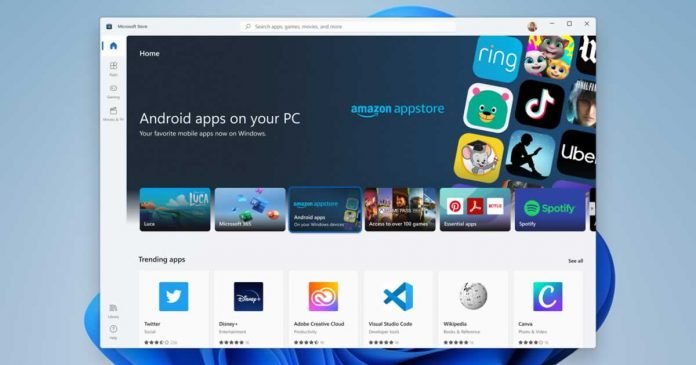
Microsoft is working to support Android apps through the Amazon Appstore on Windows 11. This is called WSA — Windows Subsystem for Android and has been tested for a long time. Finally, the platform is now officially released.

The Amazon Appstore in Windows 11 is an exciting feature for Android users looking to bring their favourite apps and games to Windows. On PC, it’s very easy to download any number of compatible apps and games. The number of apps is limited, but they’re as easy as installing them on your Android smartphone from the Google Play store.

Microsoft’s WSA and Amazon Appstore have improved since the early days of their release and are running much smoother these days. Microsoft also plans to add support for Android 13 and several new features soon.

Now it’s officially announced that WSA is available for everyone. Microsoft partner development manager Cory Hendrixson broke the news on Twitter, revealing that the Windows Subsystem for Android is now v1.

Microsoft has teased the news that there will be a full expansion to 31 countries and nine marketplaces, but the complete list has not been made public until now. Windows users in Australia, Canada, New Zealand and 28 other countries can now access a vast library of apps and games through the Amazon Appstore.

Now that it’s moved to an official build and expanded further, it’s a huge step forward and will help developers deploy their products on Microsoft’s WSA platform.

Understanding the Software Technology Behind a Route Planner

Maps and location

Let’s say you have a business that involves deliveries, logistics, or a supply chain. Then the key factor for the success of your business will be the timely delivery of goods or services to the customers. And it is only achievable through proper route planning.

In order to maximize distribution and driver performance, many businesses prefer route planning software. This software helps to automate the process of planning manual routes for deliveries. Moreover, the driver has to simply import an excel file to quickly get an optimized route for delivery. 

So let us start with what route planning software is.

What is Route Planner Software?

The route planner software is an advanced tool used to plan routes for delivery drivers. It decreases planning time and costs involved in vehicle and distribution, reduces fuel usage, and saves drivers time.

The distribution operation is simplified with multiple deliveries to different geographical locations. With the software, the drivers can also schedule or prioritize delivery. 

The route planning systems also optimize the routes based on real-time traffic situations. Optimized routes help to find the shortest route for delivery hence increasing the driver’s productivity. 

Route planner tools can do more effective and quick route planning compared to human planners. The software uses algorithms and other technologies such as machine learning, the Internet of Things (IoT), and artificial intelligence to plan the routes. 

What is the Science Behind Effective Route Planning Software?

The route planning software works based on programming and a set of complex algorithms.

The delivery route planning and optimization software is a SaaS (software as a service) solution. It means you do not purchase a copy of the software but pay a subscription fee to the provider for using it. You can also use the software from any location and via any device as it works using cloud computing. 

Route planning software has two main components:

1. Dashboard

The dashboard is the central control panel to perform most of the delivery work. It includes a map, menu, optimized button, routes, and schedules. Some of the benefits of driver management software (dashboard) are:

  • Automates route planning and optimization
  • Full access to driver’s activities
  • Enables delivery scheduling
  • Raises cost-effectiveness
  • Increases efficiency of delivery vehicles

2. A Driver app

Drivers have access to vital information like routes, schedules, and stop locations through the driver app. It includes navigation, built-in chat, and electronic proof of delivery. Some of the benefits of the driver’s app are:

  • Enables smart dispatch
  • Less stress on drivers
  • Easier to find customers
  • Raises quality customer service
  • Boost driver’s confidence

How Much Does Route Planning Software Cost?

The cost of route planning software will depend on several factors such as the provider you choose, the length of the contract, how you want to be billed, and some other factors. 

However, the price you end up paying will depend on your delivery operations. 

Advantages of Route Planner Software:

1. Faster route planning 

Creating manual routes through GPS is time-consuming. However, the route planning software works on algorithms to speed up the route planning.

The main purpose of route planning is to find a route that is both practical and fast. The route planning software saves time and speeds up the process of planning routes. 

It helps to prioritize important deliveries and save driving time. Some route planners link with mapping tools to provide up-to-date data based on traffic conditions. It increases efficiency by skipping hurdles like traffic jams. 

As per reports, the software can reduce route planning time by up to 20%.

2. Reduce operational costs

Route planning software can help to reduce expenses in various ways:

  • Optimized routes imply the vehicle needs to travel a shorter distance thus reducing the maintenance costs. 
  • The efficient routes help to complete more work with few vehicles. 
  • Fewer delivery vehicles would consume less fuel and the fuel costs can be minimized.  
  • Few vehicles on road mean it would require fewer drivers thus reducing the labor cost. 

Hence, the reduced operational and overhead costs will help you make more money at the end of the day. 

3. Increase driver productivity

The route planning software automatically assigns vehicles and drivers for delivery. The driver with the right skill ensures that the vehicle is utilized properly for completing more deliveries. It means each trip is optimized in terms of vehicle utilization and driver productivity. 

Thus, having route planning software will always help you to ease your delivery operations and also increase productivity.

4. Better customer experience 

Better routes ensure that you reach the customers faster and are not late for the deliveries. Saving time, and money and scaling your business is always a good idea. But, the success of your business will depend on your ability to adapt to customer’s demands and meet customer expectations. 

The features like electronic proof of delivery and customer notifications help you to assure that the customer delivery is satisfactory. 

Electronic proof of delivery involves taking a photo of the delivered package or a digital signature. It acts as proof against any type of customer complaint. 

Customers would appreciate transparency and peace of mind when it comes to the delivery of their packages. Getting notifications about package arrival time, and expected delivery time will assure the customers.

All these benefits will make deliveries streamlined and less stressful resulting in less time wastage and greater efficiency. 

Final Thoughts 

If you want to stay ahead in the competitive market and improve your day-to-day deliveries then route planner software is the right thing. 

Optimizing routes helps to save time, hassle, and money. Extra features like making deliveries on time and customer notifications are great ways to keep customers happy. 

The route planning software has the potential to boost the company’s growth and retain more customers in the longer run. The best results can be implemented with the proper usage of software to meet operational expectations. 

Heat Is The New Weapon For Hackers To Crack Your Passwords

thermal attacks by security researchers

Here is a new technique that should please hackers. It is possible to guess the password entered on a computer, smartphone and even an ATM. How? By analyzing the residues of heat left by the user’s fingers when entering the password. It works with a keyboard, smartphone screen, and also on the keys of an ATM.

This crazy idea comes from researchers at the University of Glasgow, Scotland. They developed a system called ThermoSecure

Through this experiment, they sought to show that with thermal cameras, whose prices are falling and artificial intelligence, which is sometimes freely available — a clever hacker can create a system at a low cost to collect the passwords of a device in seconds. They called this threat “thermal attacks”.

The user must have entered the password a little time ago for this to work. It’s strange to unlock a device and then leave it, but that is necessarily the case with an ATM. 

The hacker will use a thermal camera to take a picture of the keyboard or screen. In the image, the clearer an area appears, the less time it has been touched. By examining these areas, it is possible to determine the keys, letters or symbols used, as well as their order of entry. It compares the temperatures of the keys pressed to identify the order in which the keys were pressed. It is assumed that the lower the temperature of the key, the earlier it was pressed.

According to the researchers, even a novice who had been told how to decipher the thermal image could manage to find the password. However, the image must have been taken between 30 seconds and one minute after touching the surface. 

However, the researchers decided to take it further and use a machine-learning technique to automate password prediction.

They took 1,500 thermal photos of keyboards from different angles to feed the machine. Keyboards that had just been used to type in passwords. With the help of probabilities, they could refine their model and achieve an efficiency of 86% in finding passwords 20 seconds after entering them. 

The figure drops to 62% after one minute. We could say that the method isn’t always efficient. The percentage rises to 93% when they do not exceed eight characters. The algorithm consistently strikes the spot with six characters. 

This strategy, which still involves being near the target, cannot be used for long with the new security systems that do not require passwords like the Fido protocol and Facial recognition implemented by Apple on its devices. In the future, other devices should also use these techniques for better security.

Google Fined $162 Million In India For Anti-Competitive Practices On Android

Google India news and stories

India’s fair trade regulator, the Competition Commission of India (CCI), said on October 20 that it had imposed a fine of 13.38 billion rupees (about $162million) on Google for its anti-competitive behaviour in Android mobile devices. In addition, the CCI also asked Google not to offer any incentives to smartphone makers to preinstall Google’s search services exclusively.

The report mentioned that Google faces a series of antitrust cases and stricter technology industry regulations in India. Google’s business operations in the smart TV industry, as well as its in-app payment mechanism, are also being investigated by the CCI.

According to the CCI, Google utilised its dominance in Android’s online search and app store to maintain its position in mobile web browsers and online video hosting for applications like Chrome and YouTube.

The CCI also restricts Google from entering into certain revenue-sharing agreements with smartphone makers, noting that such practices help Google ensure the exclusivity of its search service to the complete exclusion of competitors. Google has yet to comment on this.

The US company faces many antitrust cases and tightening regulations in India’s existing tech sector. The Android-related investigation began in 2019 and was sparked by complaints from two junior Indian antitrust researchers and a law student. 

The Indian case is similar to what Google faces in Europe, where regulators have fined the company $4 billion for forcing manufacturers to preinstall its apps on Android devices.

India ordered Google not to restrict smartphone users from uninstalling its preinstalled apps, such as Google Maps and Gmail. The CCI also asked Google to allow users to choose their search engine for all related services when they first set up their phones.

According to Counterpoint Research, 97% of the 600 million smartphones in India are powered by Google’s Android operating system.

What to Look After when Choosing a VPN?

Virtual Private Networks or vpn

When choosing a VPN, there are several things you should look for. Most importantly, you need to ensure that the VPN uses a protocol compatible with your device and operating system. Here are some other things to look for when choosing a VPN.

1. Security Protocols

The most important thing to look for in a VPN is its security protocols. The most common protocol is IPsec, which is compatible with most devices and operating systems. However, there are other protocols available, such as OpenVPN and PPTP. Make sure that the VPN you choose supports the protocol that you need.

Many VPNs offer multiple protocols, so you can choose the one that best suits your needs. According to the expressvpn review, you should also ensure that the VPN uses a strong encryption algorithm, such as AES-256. Remember that the strength of the encryption is only as good as the security of the protocol it uses.

2. Accessibility

Another essential thing to look for in a VPN is accessibility. You must make sure you can connect to the VPN from any location. Many VPNs offer mobile apps that allow you to connect from your smartphone or tablet. If you plan on using the VPN for online gaming, make sure that the server locations offered by the VPN are close to your actual location. This will help to reduce lag and improve your gaming experience. Also, check to see if the VPN offers a money-back guarantee, so you can try it out risk-free.

3. Speed and Bandwidth

When selecting a VPN, you should pay attention to its bandwidth. The bandwidth determines how fast your data will travel over the internet. If a VPN service is not fast enough, you will get the dreaded lag or latency when trying to download files or watch streaming videos. It’s also essential to ensure that your chosen VPN offers sufficient bandwidth so that even when you are watching streaming video, you don’t experience lag. Most importantly, ensure the VPN doesn’t throttle your bandwidth or limit your data usage.

4. Ease of Use

You want to ensure that the VPN you choose is easy to use. After all, if it’s too difficult to connect to the VPN or use its features, you will not benefit much. Many top VPN providers offer software that makes it easy to connect and disconnect from the service. Look for a VPN with an intuitive user interface that is easy to navigate. Some VPNs even offer browser extensions that make it even easier to use the service. Remember that the easier a VPN is to use, the more likely you are actually to use it.

5. Price

Many people think that the price is the most important thing to look for in a VPN. While it’s true that you don’t want to overspend on a VPN, the reality is that you get what you pay for. If a VPN service is very cheap, it’s likely because it doesn’t offer all the features you need. On the other hand, if a VPN service is costly, it’s likely because it provides many features you may not need. The best way to find the right price for a VPN is to look at its features and compare them to the prices of other VPNs.

The Bottom Line

VPN, or virtual private network, is a technology that provides a secure and encrypted connection over a public network. Businesses often use VPNs to allow employees to connect to the company network when working from home or to travel. They can also be used to protect your privacy when using public Wi-Fi networks.

These are just a few things you should look for when choosing a VPN. By finding a VPN that offers all the features you need, you can be sure that you’re getting the best possible value for your money. Remember, a VPN is an important tool that can keep you safe and secure online, so don’t skimp on features or prices.

Meta’s Metaverse Has Not Found Popularity

Meta Metaverse Has Not Found Popularity

The Facebook group declared a year ago that it would change its name to Meta to reflect the company’s engagement in the so-called metaverse — the potential future web development in which the internet and virtual reality mingle to become something new. The founder Mark Zuckerberg changed the name and weakened the Facebook brand, making it less and less attractive to younger users.

The switch to the metaverse wasn’t simply for show. Over the past year, Meta invested nearly $10 billion in developing technologies related to virtual reality and creating software and virtual environments. An economic effort gave a very difficult period for the company, losing nearly 60% of its value compared to the peak of September 2021. 

The decline of Facebook and Instagram users, particularly to the benefit of TikTok, is one of the causes of the crisis, but so is Apple’s decision to allow iPhone users to stop tracking their behaviour for every application, which allowed Facebook, like many other companies, to personalize advertisements better. This substantially damaged the financial models of Facebook and Instagram, leaving a $10 billion void in ad income.

A few days before Meta’s first anniversary, The Verge published an article on the state of Horizon Worlds, in which the company’s metaverse manager, Vishal Shah, complains that the people who even work there do not use the platform.

Meta’s Metaverse only has 200,000 users. The Facebook group originally set itself the goal of getting half a million monthly active users excited about Horizon Worlds by the end of the year.

The idea of the metaverse remains mysterious to many, despite being relatively basic. It is, in reality, a software that recreates a virtual environment in which users may move and do tasks linked to business and leisure while wearing a particular viewer on their heads. Because the platforms that provide them differ, engaging with friends, co-workers, and strangers is possible via an avatar in the metaverses. 

Last week the New York Times released a summary of a dozen anonymous interviews with Meta employees, as well as a series of articles, revealing how this change to the metaverse has generated a lot of stress. 

The timeframe chosen by Zuckerberg, opting for significant expenditures in the short term, even though the technology required for spreading the metaverse is still in an experimental stage, is among the most common grounds for discomfort and disagreement. According to some estimations, it will still take years of development and investment to create a technology that can be deployed widely.

On October 11th, Meta held its annual business conference, Connect 2022, during which it presented the latest news related to the metaverse, a new virtual reality headset, Quest Pro — the pricing is much more than that of the previous model.

In addition to internal disagreements and economic losses this year, Zuckerberg’s breakthrough does not seem to have done the group’s image any good. In August, to publicize the arrival of Horizon Worlds in France and Spain, Meta decided to post a selfie of Zuckerberg in a poorly detailed and uninspiring virtual environment, inspiring a sarcastic meme that lasted for a few days. What was striking at the time was, above all, the poor definition of Zuckerberg’s face, very different from the promotional videos made by Meta in the last year, where it appeared to be possible to work, play, and play sports in a well-defined virtual environment. 

One of the most intriguing developments for the platform’s future is the planned cooperation with Microsoft, making extremely popular Microsoft products such as Teams, Office 365, and Azure available for virtual reality. 

Well, good things take time. Let’s wait and see.