Home Blog Page 151

AMD Has Introduced Ryzen 7000 Based On Zen 4

AMD Ryzen 7000

AMD has introduced the Ryzen 7000, aka Raphael, based on Zen 4 architecture and 5-nanometer manufacturing technology, along with the new AM5 socket platforms. The commercial debut of these processors will take place on September 27th.

For the time being, there will be four processors belonging to the Ryzen 9, Ryzen 7 and Ryzen 5 families — they are all based on the same design. The new platform is combined with DDR5 memory, thanks to which AMD has been able to obtain a significant increase in bandwidth, as well as a PCI Express 5.0 controller integrated into the processor.

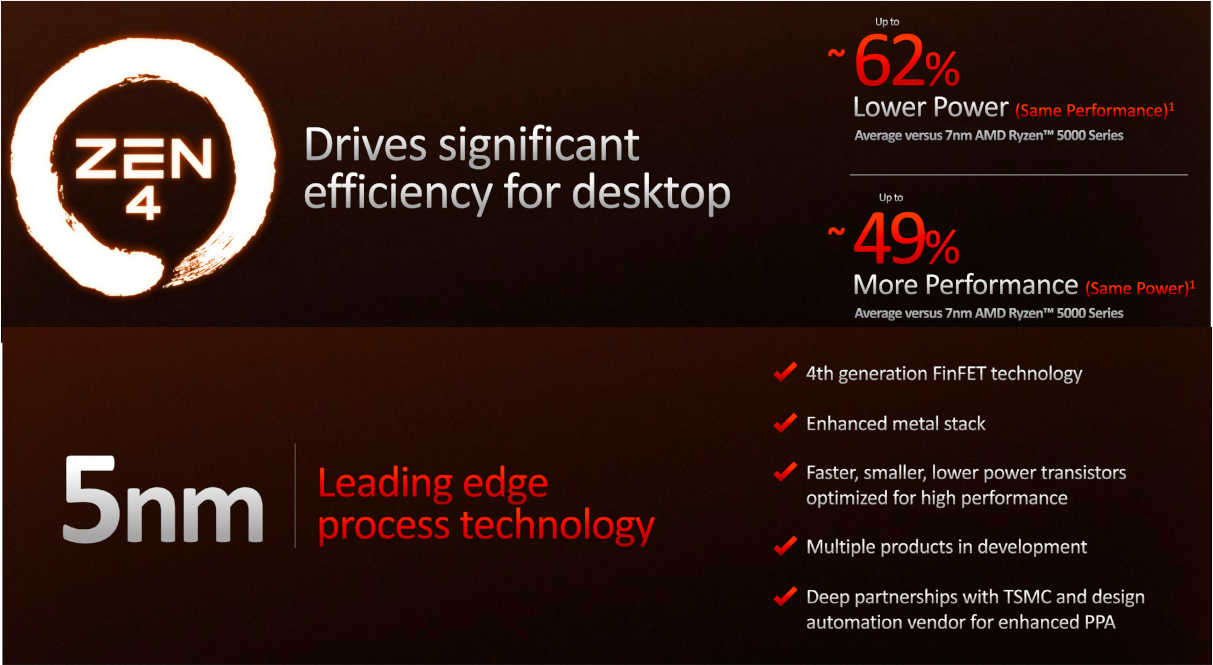
The Zen 4 architecture is said to improve the performance per clock by an average of 13 percent, and the frequencies and power budget also increase significantly. In order to achieve this type of result, AMD has also used the 5-nanometer production technology made available by its partner TSMC.

AMD Zen 4 Ryzen 7000

AMD got 60 percent of the performance gain in the area of ​​the front end, and the load/store blocks and the branch prediction have also been improved. In addition, the L2 cache was doubled to 1 MB and the µOp cache increased by 50 percent. AMD doesn’t touch the L3 cache, it stays with the well-known 32 MB for a CCD.

AVX-512, as a well-known extension that has now been confirmed in a benchmark for the first time, can contribute major performance gains depending on the area of ​​application. According to AMD, the instruction set extension should bring up to 30 percent for FP32 inferencing and even 150 percent for INT8 code, thanks to VNNI (Vector Neural Network Instructions). Unlike Intel, AVX-512 was implemented with two clock cycles, which is why the absolute throughput does not double compared to AVX2.

AMD Zen 4 Ryzen 7000 features
AMD Zen 4 Ryzen 7000 SoCs

The first four Ryzen 7000 processors for desktop PCs rely on an iGPU based on 2 CUs with a model-independent 400 MHz base and 2,200 MHz turbo clock. Ryzen 6000 Mobile currently offers 12 CUs as the Radeon 680M and 6 CUs as the Radeon 660M. However, AMD had previously indicated that the iGPU in Ryzen 7000 for desktop PCs is primarily used to fulfil the basic image output functions and for video encoding and decoding.

All new CPUs will have a small integrated graphics unit, but more details on this will only be available at launch. All must be operated with DDR5, and only this memory standard is available on the new platform around the socket AM5 (LGA 1718) with its eponymous 1718 contacts.

The cornerstones of the new AM5 platform have been known for some time; now, there are the launch details. Only the two X670 chips will appear at the start, followed by the B650 solutions from October, including the B650E as a newly confirmed solution. Another pillar of the new platform will follow in November — PCIe 5.0 SSDs.

AMD Ryzen 7000 processors

One of the novelties of the AM5 platforms is the AMD EXPO technology, EXtended Profiles for Overclocking — the compatible memories allow you to automatically use the best timing and clock frequency settings for pairing with Ryzen 7000 processors, allowing you to increase performance overall.

AMD is visibly proud of the performance, which comes to the fore thanks to the high clock and the increased IPC. According to the manufacturer, each of the four Ryzen 7000 processors can now beat an Intel Core i9-12900K in Geekbench’s single-core test.

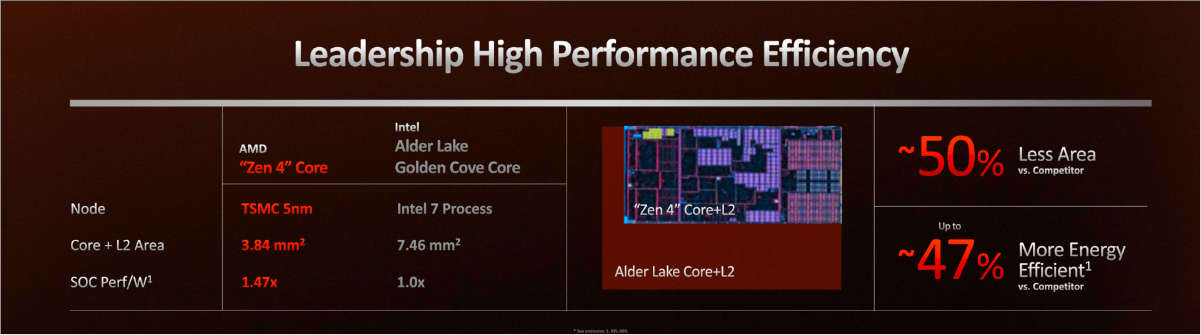
Zen 4 versus Alder Lake

The debut of the Ryzen 7000 CPUs is only the first step, for AMD, in the launch of the new generation of processors. The Zen 4 range will develop with two other versions, the first of which will be for CPUs equipped with 3D V-Cache technology, while the second is the Zen 4c one dedicated to specific EPYC processor versions dedicated to cloud areas.

12 Powerful websites that can replace your desktop software in 2022

Powerful websites

Why you have to install some crappy piece of software to do tasks like file conversion, photo editing or for graphics designing, etc. when you have a web browser.

Yes, you heard it right — “when you have a web browser” — because there are some pretty powerful websites out there that can easily replace some essential desktop software.

Web browsers — earlier we used it just for browsing and sending emails. But with development in web technologies like HTML5, PHP etc, web browsers can do some amazing things. Today, modern browsers are so advanced — you could get most of your work done inside a handful of browser tabs instead of opening up another program installed on your PC.

In this article, we are going to list some such powerful websites that use as alternative for some desktop applications. All the advanced websites listed here are free and handy to use.

Powerful Websites that can Replace Desktop Software:

1. OnlineConverter

OnlineConverter is a free online file converter lets you convert media easy and fast from one format to another. This powerful website is capable of converting audio, video, image, documents, archive files ..etc and supports almost every file format.

2. VirusTotal

VirusTotal, a subsidiary of Google, is a free online service that analyzes suspicious files and URLs to detect types of malware, viruses, worms, trojans and other kinds of malicious content and automatically share them with the security community. scanners. So simply upload your suspicious file or copy/paste file URL to this advance online antivirus to check its credibility.

3. Tinkercad

Tinkercad is a free web-based online 3D printing design tool. Tinkercad’s 3D design tools are accessible to beginners and experienced designers alike. Shapes that you place on a design field are stretched, contorted and combined to make your 3D model. It performs best with Chrome and Firefox browsers. The platform also provides 3D printing services, so your models can be printed and shipped straight to your door.

4. Canva

Canva — one of the best powerful websites to design presentations and social media graphics with the simple drag-and-drop option. Canva equipped with millions of stock photos, vectors, and illustrations accompanied by a variety of photo filters to do your task easily with a professional touch.

5. Silex

Silex is a free and open source website builder in the cloud. Create websites directly in the browser without writing code. It is suitable for professional designers to produce great websites without constraints. So with Silex build websites from within the browser, no install required, never lose your data, work instantly from any computer.

6. Pixlr Editor

Pixlr Editor — graphics editing tool isn’t quite Photoshop but is a powerful enough to edit your images online with a wide array of tools, filters, adjustment options, and yes, even layers. You can start from scratch with a blank canvas or tinker with images stored either on your local hard drive or on a website.

7. Janvas

Janvas help you to create and edit Vector Graphics in SVG format. With Janvas you can also create websites and interactive books without writing code. Unlike other powerful websites, this one is made for graphics designers, icon designers, web designers, product designers, UI designer and for all users who needs to create graphics.

8. TinyPNG

TinyPNG — compress your image smartly with this powerful website. TinyPNG reduces the file size of image files by selectively decreasing the number of colors in the image. The effect is nearly invisible but it makes a very large difference in file size!

9. Polarr

Polarr — one of the best powerful websites and elegant photo editor that replace Adobe Lightroom. Like Lightroom, Polarr is particularly good for tasks like color grading.

10. iPiccy

iPiccy — a powerful web app that converts your web browser into a photo editor. a collage maker, a graphics editor. Over 100+ photo effects and PRO-level photo enhancements, facial retouching, and frames iPiccy Photo Editor can do wonders. iPiccy Collage Maker comes with numerous templates and adjustments to brighten up your image collection. And lastly, iPiccy Graphic Designer is one of the best and easy online graphic design tool out there. With this amazing tool, you can easily add text, overlays, and stickers, apply vector masks and stunning text effects to create the most unique designs for any purpose.

11. Lumen5

Always videos draw more attention than an article. A video with important headlines scrolling in front of a well-animated graphics attracts more audience on social media. And Lumen5 is the perfect web tool for that. And the interesting thing is, just share the link to any well-written article to this powerful website it will automatically create and edit an awesome shareworthy video by its own — thanks to the power of AI. Lumen5 allows anyone without training or experience to easily create engaging video content within minutes.

12. Gravit Designer

Gravit Designer — a mind-boggling graphics design tool you can find online. Although they also have same exact software available for Windows, Mac, and Linux — online version of Gravit Designer is a powerful website that opens up portability of the app, which none of the other popular graphics editing tools lacks.

So, try out these powerful websites next time instead of installing the software. Soon we will add more such advanced websites that could replace desktop applications.

Apple Intends To Register Several Trademarks With The Word ‘Reality’ For Its Mixed Reality Headset

Apple AR Headset

Apple plans to register several trademarks with the word ‘Reality’ — Reality One, Reality Pro, and Reality Processor through fronts that could be used for upcoming mixed reality headsets.

It is reported by Bloomberg with reference to the company’s applications filed in the US, EU, UK, Canada, Australia, New Zealand, Saudi Arabia, Costa Rica and Uruguay. The company applied for the Reality One, Reality Pro and Reality Processor brands through a network of offshore companies and law firms that it has used to register trademarks in the past.

Regulators haven’t yet approved Apple’s exclusive right to use it, so it could all change between now and Apple finally unveiling its VR headset. Apple is expected to release its first mixed reality headset in 2023.

However, it is not the first time that we have heard the word Reality together with the rumors of Apple glasses. Earlier this year, Apple-related trademark applications also surfaced for the name realityOS, which would be the operating system that would govern the glasses and their associated products.

According to Bloomberg, the flagship model of the VR device, which is now codenamed N301, will be called Reality Pro. After the N301, the company is announcing an upgraded device, codenamed N602. The third will be represented by augmented reality glasses — N421.

The publication also suggested that the Reality Processor brand most likely refers to a modification of the M2 processor with 16 GB of RAM, which will be adapted for VR and AR devices.

Apple is expected to show Reality Pro next spring at WWDC. The remaining two devices, according to Bloomberg, will see the light before 2030.

Google Chrome Will No Longer Let You Use Ad Blockers

Google Chrome Will block Ad Blockers

Ad blockers, web browser extensions that block ads, are very popular, but the internet is largely based on advertising, and Google seems to want to eliminate such extensions in Google Chrome or at least the way they currently work.

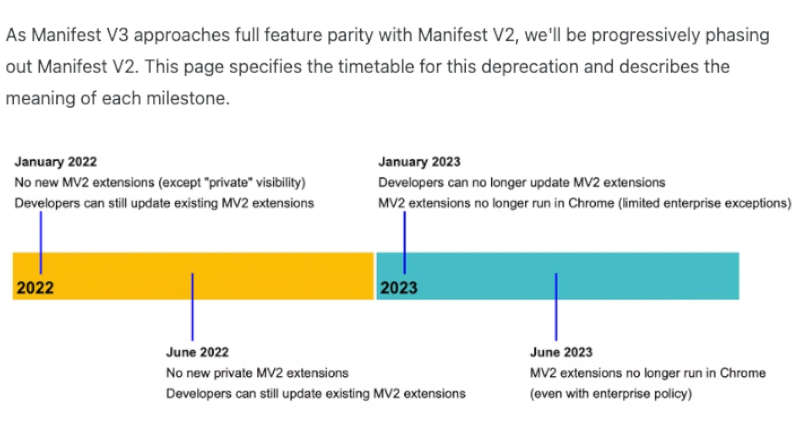
From January 2023, Google Chrome browser extensions designed to block ads will no longer work.

This is indicated by a document intended for developers. During this period, an update will be released that will add API support for extensions to Manifest Version 3 in the browser while all ad-blocking applications run on version 2.

Google Chrome Manifest Version 3

At the same time, it makes no sense to install extensions in advance — they will simply cease to function after the update. So far, there is no solution, but the developers report that they are already working to solve the problem and are preparing new versions of ad blockers.

The jump from Manifest V2 to Manifest V3 is not a change aimed solely at killing ad blockers. It actually brings some interesting new features to the manifest file. The key is found in the fact that Google will prevent the extensions from accessing webRequest, an API that is key in the operation of the extensions.

And the problem is that the offered alternative, declarativeNetRequest, prevents the extensions from carrying out the filtering work, which now depends exclusively on the browser itself.

Google Chrome’s decision to ban ad blockers like Adblock will surely cause thousands of users to migrate to other browsers that do allow them, including Mozilla Firefox, Microsoft Edge, Brave browser and others.

The Benefits of a Fast Online Video Editor

Fast Online Video Editor

Online video editors are proven to be a priceless resource for small businesses as more industries digitize and shift towards the online market.

A fast online video editor is the ideal place to begin if you are new to creating and editing videos. You can quickly create all other kinds of marketing videos in addition to social media content that you can post on Facebook, Twitter, and Instagram.

3 Benefits of Using a Fast Online Video Editor

Are you still unsure if you should join the online video editing bandwagon? Here are some of the reasons why you should be using an online video editor to create your videos:

It’s Easy to Use

Most video editing software with pre-made templates, like FlexClip, Flixier, don’t have any learning curve at all. Your job will be half done if you can find one with an easy-to-use user interface.

All you need to do is upload your video, pick a template, or start from scratch, add your branding elements and some persuading text, and you’re ready to go. In a matter of minutes, the whole video editing process can be over with.

Flixier is a fantastic video editor for beginners. The robust timeline allows you to rapidly arrange or stack clips in sequence, and you can quickly add a professional appearance to your videos using our pre-made transitions, motion titles, and calls to action. Your can even add music or effects to your videos.

It Takes Less Time to Render Videos

If you’ve used offline video editors before, you already know that rendering a video takes a lot of time and patience. Thankfully, when you render videos online, your video is ready for posting a couple of minutes after clicking the “Export” button.

Of course, the speed level also depends on the type of online video editor you have chosen. Even if your videos are an hour in length, the cloud-powered infrastructure used by Flixier will enable you to save them to your computer in less than 3 minutes.

Additionally, you can simultaneously upload your videos to numerous platforms, such as YouTube, Vimeo, Google Drive, or Dropbox, in a couple of seconds.

You Can Easily Collaborate

Video collaboration is one of the reasons you should use a fast online video editor. Why? Let’s think about the traditional video editor for a second. If several people collaborate on a project, they must take turns using the same computer or create a file-sharing mechanism to guarantee that everyone is using the most recent version of the video.

On the other hand cloud video editors allow multiple contributors to log in to the same project, submit media from their own sources, examine the most recent version, and make modifications from their own devices using an online video editor. Video files can be shared without being sent back and forth via email, and there are no compatibility difficulties if team members use different operating systems.

With Flixier’s simple collaboration tools, you can share projects and files right away and keep them updated and in sync, much like with Google Docs. To receive immediate comments on your videos on Flixier, simply share a link and take advantage of the collaboration tool.

You may track down the exact points in your video where modifications need to be made by asking your customers, colleagues, and other collaborators for input.

Start Using a Fast Online Video Editor!

Now that you know more about the advantages of a fast online video editor, all you have to do is to start editing your video content. With Flixier, a feature-rich, user-friendly, and entirely cloud-powered platform, you can create amazing videos that engage your audience, no matter where you share them.

Not convinced yet? What about trying the free editing tool?

LaMDA 2 Beta Access: Google Invited Everyone To Test Most Advanced AI Chatbots

LaMDA 2 beta access

Earlier this year, Google announced the AI ​​Test Kitchen app, which will allow users to interact with one of the company’s most advanced AI chatbots, LaMDA 2.

The researchers of the AI ​​division of Google have announced that the registrations are now open to be able to request beta access to LaMDA 2 and that they will be gradually open to more and more users. Now the LaMDA 2 beta access is “begins to gradually roll out to small groups of users in the US, launching on Android today and iOS in the coming weeks.”

LaMDA 2 is the natural language processing model developed by the Mountain View giant and which had already carved out a place in the news in the past weeks — when a Google developer was first put on leave and then fired because he had publicly stated that there was a possibility that LaMDA (Language Model for Dialogue Applications) had gained consciousness to some extent.

The first set of demos to include AI Test Chicken will explore the capabilities of the latest versions of the LaMDA language, which has “undergone key safety improvements.” One such demo called “Imagine I It” lets you name a place and walk “paths to explore your imagination.”

Another demo, “List It,” allows the user to share a goal or tagline, and LaMDA will break it down into a list of useful subtasks.

And finally, the “Talk About It (Dogs Edition)” demo opens the possibility of having “a fun, open-ended conversation about dogs and only dogs, which explores LaMDA’s ability to stay on topic even if you try to veer off-topic.”

What Google intends with this app and these tests is to show users LaMDA 2’s capacity for creative response, this being one of the main benefits of the language model. Google warns that some answers “can be inaccurate or inappropriate,” which is common in chatbots open to audiences with harmful and hateful speech.

LaMDA 2, like many other chatbots, can produce “harmful or toxic responses based on biases in its training data, generating responses that stereotype and misrepresent people based on their gender or cultural background.” Something that, by the way, Google is investigating.

10 Top Game Creators To Look Up To

Top Game Creators

The gaming industry is booming: people have become interested in high-quality games with exceptional story lines. We all know video games, but do we know the names of their creators? Let’s begin and take a close look at designers and lead developers who fascinate us with their professional accomplishments.

1. Sid Meier

A Canadian-American developer, designer, and executive producer of many strategies and simulation video games. During his career, Sid Meier has stamped his name on every single game he made: Sid Meier’s Pirates, Sid Meier’s Civilization, Sid Meier’s Railroads.

Meier started his career path by developing cash register systems for department stores. He found a co-worker, Bill Stealey, who was also interested in video games, and that’s where his professional calling started from.

2. Shigeru Miyamoto

The rock star of the game industry, his name is iconic for gamers around the world. Everything Shigeru Miyamoto makes becomes a role model for other creators. He has the key skills required to be a game designer: creativity, professional view, and the ability to conquer a job market.

By the way, did you know that this video game designer from Japan initially hoped to become a professional manga artist? He graduated with a degree in industrial design and showed there are no limits to becoming who you want to be.

If you feel the same power for a particular field, don’t hesitate to pursue your dream job. If your goal is to get more interviews, let our expert writers help you out to create a bot-beating resume and pass ATS bots easily.

The other option is asking a career advice expert for help so that you’d be more confident in front of a hiring manager.

3. Hideo Kojima

The man who revolutionized the game Metal Gear. One day he helped create the series that improved the stealth genre. Hideo Kojima brought all his skills and accomplishments to Konami, the big studio well known for Silent Hill, Castlevania, Contra, and other video games.

4. Hironobu Sakaguchi

The work experience of Hironobu Sakaguchi as a game designer, director, producer, and writer, includes the Final Fantasy series, Chrono Trigger, Blue Dragon, Lost Odyssey, and The Last Story.

Thanks to Sakaguchi, gamers imagine the JRPG series as having lots of strategic gameplay, big swords, and adorable mascots.

5. John Carmack

John Carmack is an American video game developer and a co-founder of the video game company id Software. A vast part of gaming in the 90s can be characterized by his exciting games — such as Commander Keen, Wolfenstein, Doom, and Quake.

His career in creation began by working as a freelance programmer. Later, Softdisk, a computer company in Louisiana, hired Carmack to work on Softdisk G-S (one of the Apple publications). He’s trying now to push games into a whole different dimension by working on the Oculus Rift Virtual Reality project.

6. Will Wright

Will Wright is another web designer and creator of the most successful simulation games (the most famous one — the Sims). If you’ve never crafted a city on your own or expanded your qualification in micromanaging the suburban household, you’ve probably missed something in life.

Most of his games, Wright, are based on the complex adaptive systems and the books that describe them. He has a strong vision of what motivates players and sparks an interest to join the game.

7. Gabe Newell

Gabe Newell is one of those inspiring personalities who dropped out of Harvard to later become a millionaire thanks to the games. While he’s less a developer and more a producer, Newell was involved in a little series called Half-Life.

Working at Microsoft and ID Software, Gabe Newell founded the Valve Corporation — game development and digital distribution company.

8. Warren Spector

An American designer, writer, director, and production designer. He was engaged in producing both table-top and video games; he cooperated with Disney to produce the Epic Mickey series.

Spector is not the guy to do an online job; he’s more of a hands-on person who likes to be engaged in a process. He’s done enough to earn fame in the gaming community: System Shock, Deus Ex, Ultima, and Thief.

9. Alexey Pajitnov

The creator of Tetris, who started receiving royalties only 12 years after the game was released. Alexey is from Russia (now a U.S. resident) and recently worked on the Xbox version of Hexic and Hexic 2.

10. Shinji Mikami

Shinji Mikami is a mastermind for survival horror games, the most well-known for his Resident Evil series. The first episodes of the franchise were practically the pilots in the genre. The other game classics you might know, which were produced by Mikami, includes the hack and slash gem Devil May Cry series and his latest survival horror tale, The Evil Within.

Summing Up

To land a job in the game industry, you don’t need a specific education. To pass through resume-scanning software, you don’t have to be involved in a writing business. The top game creators described in this article have never stopped working on their goals; having different backgrounds, these individuals managed to find themselves a niche and earn their creative freedom.


Improve Your Small Business in These 6 Ways

IT Support and business

Running a small business is a little like running a circus. You’re juggling everything all at once and often trying to take charge of things you don’t actually know too much about.

Naturally, things can get overwhelming and trying to improve your business is impossible when you’re struggling just to stay afloat.

But with the right tools and techniques, you can improve the way you do things and see immense growth in your company. Here are a few tips:

Investigate New Software

There will always be another tool, app, programme or website that will be able to help you run your company in some way or another. 

Depending on the nature of your business, you could look into software to assist with field service management, operations management, asset management, security operations, financial or accounting tasks, etc. Decide which of these are worth investing in and will yield the results you want. 

Start Tracking Productivity 

If you worry that too much of your time is being spent on unimportant tasks and that the same might apply to your employees, you might want to start time tracking. There are plenty of apps and programmes that will help you do this.

They’ll allow you to see how much time is being spent on which tasks, and you’ll be able to analyse whether or not there is a lack of efficiency in the way you and your employees are doing things. 

Try New Marketing Tactics

If you’re not seeing growth, you need to take a look at your marketing strategies. It might be time to get on top of social media marketing, influencer marketing or try a new route altogether.

Depending on what you’re doing and what results it’s yielding, consider what fresh, new ideas you can inject into your marketing plan in order to reach a wider audience or generate more sales. 

Monitor Your Finances Closely

Tracking your business expenses (and income) meticulously and religiously is crucial for your overarching growth as a business owner and company. If you don’t know how much is coming in and going out at any given point, you could be missing crucial data.

Make sure to budget carefully and track all your finances closely. Try to implement a financial check-in once a week or fortnightly, and use software or spreadsheets that help you get a good overview of what’s going on at all times. 

Focus on Customer Feedback

A great way to be able to improve your business and the way you do things is by collecting customer feedback and acting on it.

There are plenty of (free and simple) ways of gathering this info, and customers are often happy to give their opinions. Look for patterns and see how and where you might be able to improve. 

Be Adaptable

Finally, if you want to see growth, you have to be adaptable as a business. 

Being willing to implement change, even in the areas you were passionate and certain about, is the only way to overcome weaknesses, push past challenges and reach the potential that your company has.