Home Blog Page 154

Apple Expanding Its Own Advertising Business: Consider Showing More Targeted Ads In Its iPhone Apps

Apple security compare to Android

While Apple limits the ad business of rivals like Facebook and Google on its platforms, the company makes millions of dollars from its own targeted ad service. According to Mark Gurman of Bloomberg, Apple may be ready to further expand this service.

If you don’t know — Apple has its own targeted ad system. It’s called Apple Search Ads, and it allows advertisers to run campaigns on the App Store, Apple News and Stock Market applications on iPhone, iPad and Mac. Even in the United States, it also has agreements to offer ads within Apple TV+.

Todd Teresi, Apple’s vice president of advertising platforms, intends to increase annual revenue in this segment to “double digits”, while now this figure is approximately $4 billion a year, according to the source. Advertising will increase by about 250%.

Apple has already begun testing ad integrations in the Maps app. In the future, ads will be added to the Books and Podcasts apps. Apple has already announced that users will see more ads in the App Store soon. New ad units in iOS 16 will allow these types of content to appear on the Today tab of the App Store, as well as at the bottom of pages in other apps.

The truth is that Apple’s movements in the advertising business have not been without controversy in the past, mainly because of its speech as a defender of user privacy. The company launched in 2021 with iOS 14.5 App Tracking Transparency (ATT), which allows users to decide whether or not they want to be tracked for targeted advertising. However, Apple apps that include ads do not have to go through this filter; that is, they do not ask users for permission to be tracked. 

5 Ways to Increase Student Retention With Technology

Students and technology

Retention has been an ongoing problem with colleges and universities, as they continuously struggle to prevent both new and existing students from switching schools. However, retention rates seem to be decreasing, with a notable 0.8% drop from 2018 to 2019. Hopefully, this trend will continue in the years to come. 

But what about now? What are some ways to increase student retention at this moment? One thing that can significantly help is technology. With an increasing number of innovations in this field, we can rely on tech to carry us through challenging times. So, let’s see some of the ways that technology can help in this case.

Increase Student Connection via Messaging

The first of the 5 ways to increase student retention is quite simple and direct — communicate with students more through their preferred messaging platform. As you might know, university and college students spend up to six hours on their mobile devices every day. With that in mind, messaging is a great way to keep up with them without going overboard.

Luckily, technological advancements have helped in this aspect by offering numerous messaging tools and apps. Some of the most popular solutions include WhatsApp and Messenger, but traditional SMS texting is still an option as well. This is a terrific way for advisors, assistants, and even professors to connect with students and give them a helping hand.

Rely on Message Boards

While we’re on the subject of messaging, we have to mention that large campuses often struggle to include all students in some type of social activity. That’s where online message boards step in. They represent a great way to promote inclusivity and invite students to join various activities, like clubs, social events, and more.

We have to note that these message boards are especially beneficial for first-year students who may find it challenging to fit in. It is a great way to introduce new engagement opportunities and make them explore something new.

Introduce Chatbots for Greater Engagement 

Technology has allowed people to get access to new information easily. Thus, many online websites offer chatbots to boost engagement. This approach is now widely accepted by colleges and universities — more on that here.

Although most chatbots are automated, they can still provide useful information and data to students. These tools facilitate self-discovery practices. Moreover, many higher education establishments have even hired live assistants who can help with more complicated matters. By using the chat box, students will get all the information they need in no time.

Use AI to Process Feedback

Artificial intelligence (AI) has proven to be extremely beneficial in all spheres, including this one. With an increasing number of people attending colleges and universities, AI can gather information and learn student preferences and behaviors to create material that aligns with their needs and wants. This can include different programs, activities, and so on.

AI does not violate student privacy but gathers data based on students’ social media posts, chatbot responses, online forum replies, and more. This allows AI to process feedback and prepare adequate responses. Since students are often more active through such digital channels, this enables AI to analyze their behavior and provide responses regarding their after-school activities, extracurriculars, and even transportation or food.

Send Targeted Surveys

If you want to target students with specific questions, you can easily do so through surveys. These represent a great and optimized way to find out what students are thinking. You will be able to collect direct feedback, thus improving their overall experience. Targeted surveys allow you to find out how students feel about not only their classes and professors but also housing, advisors, campus activities, on-campus clubs, and more. 

Such surveys are also a great way to encourage student participation. Not many students like to engage in on-campus polls, but online ones typically represent a popular alternative.

Channel Store: YouTube About To Start A Streaming Platform

youtube limitation monetize channels

YouTube plans to launch an online store for streaming video services, through which users can directly subscribe to partner streaming video platforms.​

The video hosting management is already negotiating with copyright holders to participate in the project, reports The Wall Street Journal, citing sources. The so-called “channel store” could be launched as early as autumn.

The video hosting wants to combine various streaming services within its platform and implement a subscription selection function within it, while both YouTube and the streaming service will receive revenue, and the conditions will vary depending on the partner.

In early 2020, YouTube had already proposed the idea of ​​building an online store for streaming video services. Today, with the increasingly fierce competition among streaming media platforms, this idea has gained the support and favour of many platforms.​

Today, the establishment of streaming media video platforms has become the general trend — other companies are developing similar platforms — including Amazon, Apple and Walmart. Netflix and other streaming services have also partnered with Verizon’s service.

But with the increase in the number of platforms, the growth rate of users on each platform has gradually slowed down, and in order to attract more subscribers, these tech giants have taken a new step — seeking cooperation with companies.

Jeffrey Hirsch, chief executive of Starz, a premium cable channel in the United States, said streaming services are bundled with other products to make subscriptions easier and faster, and for users, “simple is best.”​

In response to this trend, YouTube’s “channel store” will be specially created for streaming media platforms that can not only focus on publicity but also realize quick subscriptions. The large and diverse audience is YouTube’s biggest selling point. YouTube has more than 2 billion monthly logged-in users.​

At first, it will be available only in the United States, but in the future, the store will open in other countries. The platform is currently in talks with streaming services such as Amazon Prime Video, Roku and Apple TV, among others. In addition, YouTube TV subscribers can already subscribe to the HBO Max channel bundle for $64.99.

The Final Version Of Android 13 Has Been Released For Pixel Smartphones

stable version of Android 13

After two developer previews and four beta versions, Google has just released the final version of Android 13 for Pixel smartphones to download. The update to Android 13 will be available to all Pixel 4 and newer owners.

The release of the stable version of Android 13 happened earlier than expected. Android 12 was released in October last year, and Android 11 in September 2020.

Google also confirmed that by the end of the year, devices from Samsung, Xiaomi, OnePlus, Vivo and other manufacturers will start switching to the new version of Android.

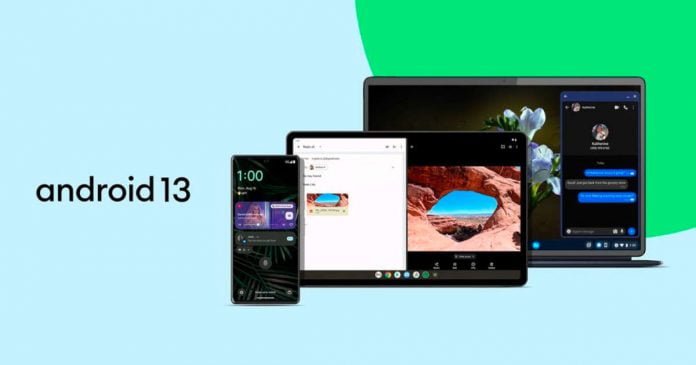
The changes associated with Android 13 affect areas such as personalization, data protection, new comfort features and adjustments for larger screens. Android 13 integrates the innovations introduced with Android 12L, intended for smartphones with large and/or foldable displays. On tablets, Android 13 delivers a new taskbar from which apps can be dragged and dropped into split-screen mode. Tablets with stylus support should benefit from better recognition of touch by the hand or the pen under Android 13.

Key features of Android 13:

  • the ability to customize the icons of third-party applications in the same style as the splash screen
  • new type of notification
  • options to restrict access to photos and videos for a specific application
  • language selection for each application
  • updated media player with customizable appearance for the style of the track
  • gets native support for spatial audio
  • Bluetooth Low Energy support

In addition to the launch of Android 13, the free version of Android has also been released today, that is, AOSP 13, so that all those manufacturers who have opted for this version of the operating system without Google’s proprietary components have already been able to start working on the jump to this new version of the OS for their devices.

What is cross-boarding and why do we need to do it?

Organizational onboarding

Organizational onboarding is the process through which new employees join a company, beginning with job confirmation and continuing with employee orientations and the necessary training to be effective in a new function. The induction program is important for integrating a recruit psychologically, physically, and professionally into a company and its operational procedures.

Talent acquisition is a complex task. The right onboarding tools can aid in talent acquisition with the proper cross-boarding of the workforce from one job role to another. Addressing and onboarding the right potential talent is important for organizational success. What if the talent you seek is already in the workforce? To do so, you must have a strong system in place to identify the talent you require and cross-board them, which is the best way to enhance their potential.

Consequently, in the situation when employers’ hiring and salary budgets are low and they are often unable to fill a position with a new employee, internal cross-boarding may be regarded as a far more pocket-friendly and also considerably less hazardous option.

What does it take to develop programs that prioritize internal hiring over the search for talented candidates outside of the organization? This article will go over everything you need to know and will assist you in creating a process that will help you save money on hiring.

What is cross-boarding?

Cross-boarding is the procedure of analyzing existing employees, determining who might be a good fit for a vacant position, and then training and adapting the selected employee to the promotion and change of role. Rather than looking for new employees, it is about leveraging existing resources within the organization to perform tasks that arise.

It is possible to create a strategic cross-boarding process by evaluating your existing employee’s onboarding process in the context of an existing member of staff going to transition into a new role. As a result, the updated process can significantly ease the transition by increasing the role inductee’s engagement and willingness to take on the new role within the organization.

Why should we need to include cross-boarding?

Existing employees transitioning into new positions have numerous advantages, including high engagement and retention rates. Additionally, there is the benefit of hiring workers with deeper cross-functional understanding.

Cost-effective:

The training costs for developing skills in an existing employee are much lower than the costs of onboarding an external employee who is entirely new to the organization and operations. A newcomer may require information about company culture, values, and corporate objectives, but a cross-boarded employee does not. All of this is already known to a permanent employee. This saves time and leads to increased productivity.

Lower risk:

When you recruit new employees, there is a chance that they will underperform. They may be dissatisfied with their responsibilities or may leave the company in search of better opportunities. On the other hand, cross-boarding lessens that risk because the staff is already familiar with the goals and objectives of the organization. Furthermore, they will see the new role as a fresh start and will push themselves to progress in their professional careers.

Enhanced productivity:

Employees reach peak productivity quickly after completing the cross-boarding process. This is primarily due to their familiarity with the existing techniques and structures of the company. Furthermore, with training, they can understand their new role and start taking on the necessary responsibilities.

Improved retention:

Employees are always searching for new opportunities and ways of improving their skills, and cross-boarding can provide both. Employees are more likely to stay with a company if they can develop their professional careers through proper training and mentoring. This is due to the organization’s decision to allow employees to change jobs if they are interested. This increases retention and makes sure to keep your most valuable assets in the long run.

Improve the company culture:

The structure and decision-making of a company reflect its values and culture. When a company makes an effort to cross-board its employees, it demonstrates that it cares about and supports the success of its employees, and they will be proud to support this company.

Enhanced employee engagement:

When done in the right way, onboarding can set the tone for future employee engagement and reduce turnover. Cross-boarding accomplishes the same thing. Cross-boarding allows existing employees to acquire knowledge, develop new skills, advance in their careers, and feel valued, which leads to increased job satisfaction and motivation.

Conclusion

If the people experience and managers identify potential and capable cross-boarding applicants, they must keep an ear to the ground to analyze which employees have the right skills and potential to fit the new role. Internal hiring is completely tailored to your preferences. You can modify it to meet your specific needs and requirements. 

To design a cross-boarding system that will benefit you, however, you must first start by understanding the dynamics of the modern world. Invest in your work and create a corporate culture that encourages employee engagement, productivity, and continuous improvement.

Pixel 6a 60Hz Screen Overclocked To 90Hz

90Hz on Pixel 6a

The mid-range Google Pixel 6a comes with a 6.1-inch OLED display running at 60Hz, but there’s a way to overclock it to 90Hz. Twitter user TheLunarixus found a way to take the screen of Google’s Pixel 6a from a regular 60Hz to a 90Hz frame rate.

Various users confirmed that the modification works and that the frame rate is actually 90Hz. The Verge has also confirmed this.

So far, Google has not yet commented or confirmed on this — whether the panel actually supports 90 Hz and Google has deactivated this frame rate via software for marketing reasons, or whether it is a 60Hz panel that is overclocked by the mod. All thanks to the fact that the Google Pixel 6a has the same screen as the Pixel 6, where the default frame refresh rate is 90Hz.

To unlock 90Hz on Pixel 6a, you need to enable debug mode, and OEM unlock in settings, then unlock the bootloader, manually flash Android 13 beta with some checks disabled, and flash a modified vendor_boot image. The result of all these actions unlocks the Smooth Display option and the ability to force the maximum refresh rate in the developer options to 90Hz.

If the display is overclocked, it is unclear how this will affect the image quality in the long term. In any case, TheLunarixus wants to publish a custom ROM in which the option can be selected in the settings. According to him, the voltage of the panel was not changed.

Best Professional VPN Services To Protect Your Privacy In 2022

VPN security news

Whether it’s for work or private life, in modern life, we ​​can’t miss an Internet connection even for a single day. With the spread of public Wi-Fi, an environment where you can use the Internet for free anytime and anywhere has been established. But then there is the issue of security. 

A VPN is a communication system for using the Internet safely. VPN is an acronym for Virtual Private Network. Originally, a private network (dedicated line) secures a dedicated passage by wire, but a VPN constructs a virtual dedicated line by encrypting the communication content while using the normal Internet. 

The need for VPNs has increased in recent years due to the increased use of public Wi-Fi at cafes and other places. In countries with internet censorship, VPNs are also used to avoid government censorship. In addition, it is also used to break through the border barriers of Internet services, such as watching country-specific Netflix in your country. It is also used to anonymize your Internet history. That way, you can get away from those annoying advertising tactics that track your history and show you relevant ads.

VPN uses three mechanisms of “tunnelling”, “encryption”, and “authorization” to virtualize a “dedicated line”. This operation is performed by a VPN server placed between the terminal and the Internet service. By intervening with the VPN server, the communication sent from your terminal enters a virtual tunnel and is encrypted, making it impossible for a third party to peek. Internet service providers (servers) will not be able to identify IP addresses, etc.

Finding a high-performance VPN can be very difficult. Some VPNs are good for watching videos, but the security features are not very good. Also, many VPNs track your internet usage and don’t properly encrypt your traffic, making them unreliable.

Save yourself the time and hassle of searching for a high-performance VPN. So we have created a list of top 3 VPNs for you

iTop VPN

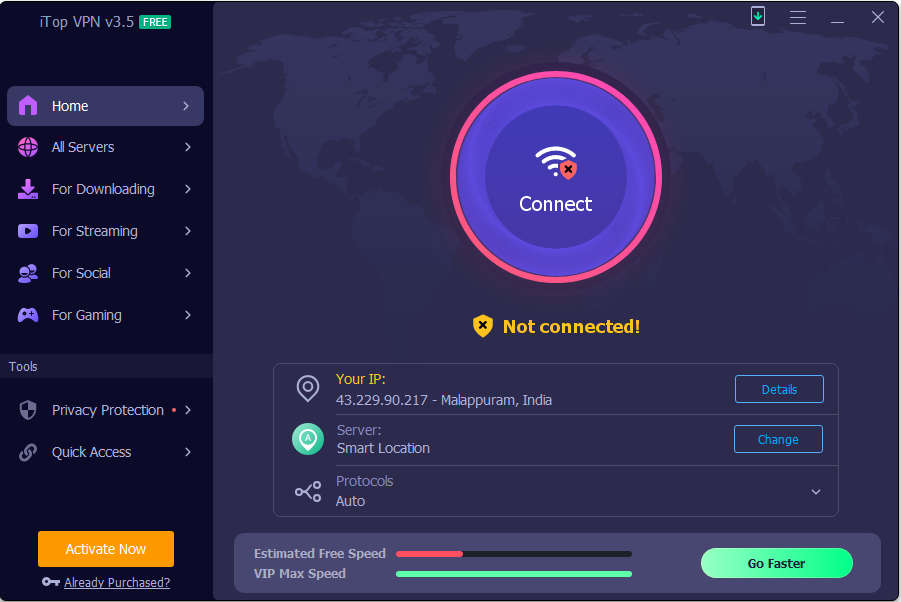
iTop VPN has been in the market since 2016, one unique feature about it is that it can be used for free without user registration. Servers are installed in over 100 regions around the world, and you can unlock region restrictions with a single touch. Even the free plan uses military-grade encryption technology to encrypt your data and maintain your anonymity online. Windows has 700MB of daily data traffic and can connect to 16 servers. iPhone/iPad and Android have unlimited traffic and can connect to 10+ servers.

iTop VPN review

Features:

Privacy 

iTop VPN does not track, store, or sell any of your data, including the websites you visit, the time you spend on our website, or your downloads. This application offers additional security features on top of the VPN service like automatic clearing browser history, block browser ads and block ISP spying. In this way the user becomes completely anonymous.

Large collection of IPs

The latest version of iTop VPN allows users to choose from her 1,800+ servers in 100 locations. You can connect to any server at high speed, even if you are far from your physical location.

Streaming unblocker

A VPN can unblock streaming from Netflix, BBC iPlayer, Disney Plus, Hulu, and more. Users can have access to exclusive shows not available where they live.

Unlimited game servers

Game players can use it to reduce ping time for quicker response and also defend against DDoS attacks.

iTop VIP account provides unlimited games servers. Upgrade to Premium and choose your favorite game server. 

Unblock Social Networks

iTop VPN can be used to unblock social networks like WhatsApp and Skype for a user living in certain countries where they are blocked.

ExpressVPN

ExpressVPN is a secure Windows app that protects your computer data. Its military-grade encryption protocol uses robust 256-bit AES-CBC with HMAC authentication and perfect forward secrecy. Internet Kill Switch temporarily stops all web traffic if your connection drops unexpectedly. ExpressVPN also has IP address, DNS, and WebRTC leak protection to prevent data leaks. So, you can expect quality for the price when it comes to accessibility, privacy and good security standards.

Features:

Great UI

From the moment you install ExpressVPN on your PC, you will immediately feel the ease of use. It defaults to an intuitive interface and a window with a large, obvious VPN connection on/off button. It also has smart server recommendations, multiple VPN protocols, a kill switch, and many other features.

Tunneling

A further bonus point is that split tunneling can be used.

Split tunneling allows you to apply the VPN to only specific apps, allowing your browser to connect locally while applying the VPN to your torrent apps.

Streaming

Using ExpressVPN to watch international Netflix and sports coverage is also very useful. In tests conducted by our verification team, we were able to unblock Netflix (and Amazon Prime) geoblocks every time.

High speed communication

ExpressVPN provides excellent performance on local servers and very decent results over long distances. Plus, Express VPN now offers access to its own Lightway protocol, so you can expect it to get even better.

Security

In terms of security, ExpressVPN offers industry-leading security and strong encryption. It does not collect or log any traffic data, connection IPs, or any online activity.

CyberGhost VPN

With CyberGhost access overseas content on your Windows PC with a large server network. CyberGhost’s server network is impressively large. You can connect to 9,023 servers in 91 countries with VPN software for Windows. Experience a large server network with a 24-hour free trial. Although there is a time limit, the functions and service contents are the same as the paid version. Each server is labeled for its purpose, making it easy to find the right server for your needs, whether you’re browsing, watching videos, or torrenting.

Features:

Streaming and speed

With fast speeds and unlimited bandwidth, you won’t experience lag while watching any tv show on any streaming platform. It’s not as fast as ExpressVPN, but it’s fast enough to watch HD videos on your Windows PC.

Security

It also has AES 256-bit encryption and IP/DNS leak protection making it a highly secure VPN. It’s nearly impossible for an outsider to spy on your online activity. Additionally, CyberGhost offers multiple security protocols, including WireGuard, OpenVPN, and IKEv2. 

Privacy

It does not store any IP addresses, DNS or any user data. It also has an ad tracker, and malware blocking features that help enhance your privacy.

There is a possibility that the free VPNs can be insecure and often sell user data for profit. In this article, we’ve listed the best VPNs that you can trust. That’s why we recommend a cheap premium VPN like iTop VPN as it is a strong all-around VPN for privacy, speed, and unblocking sites and contents.


Best Apps To Clean Up Your Windows PC In 2022

Apps To Clean Up Your Windows PC

When using Windows, temporary files are often created and remain undeleted. In addition, many files are created without the user’s knowledge, such as Internet Explorer (IE) caches, cookies, and files containing history information of various applications. Some of these files include those that become unnecessary when the work is completed, and those unnecessary files should be deleted from the viewpoint of privacy protection. Also, if you have a PC with a small amount of disk space, you can increase the amount of free disk space by deleting them. Resulting in a well-optimized PC too.

PC optimization extends the life of your PC and prevents viruses, bugs and malware from infecting your important data. It is very effective in increasing the speed of your computer and increasing your business productivity.

Unnecessary files can be deleted with the Windows Disk Cleanup tool, but different caches and application history information files must be deleted individually. Tools that can collectively delete such unnecessary files are called PC Cleaners. It performs multiple tasks such as clearing caches of various programs, deleting corrupted registry files, finding and deleting temporary files, etc. You can restrict various processes from using RAM in the background.

Too many start-up items and a bloated cache can slow down your PC, so you should run PC Cleaner regularly to identify problem areas. So, here is a list of top 3 PC Cleaner applications.

Advanced SystemCare

Advanced SystemCare is software developed by IObit that optimizes and speeds up your computer for all Windows series. 16 years have passed since the first release in 2004.

Advanced SystemCare 1

Advanced SystemCare is a smart system cleaning and optimization tool that can remove junk files in a hassle-free way. This all-in-one software tool scans, repairs, enhances and optimizes the performance of your entire system, including your internet connection. As digital devices, computers are prone to errors and problems.

There are also some features that protect your privacy by deleting sensitive information after you close your web browser. IObit developed Advanced SystemCare to meet every user’s need to fix their system for better and non-stop performance. 

It has two modes for scans AI mode and manual mode. AI Mode can clean and optimize your PC intelligently. In Manual Mode, 16 modules are listed, and you have to manually select the modules you want to clean and optimize.

Advanced SystemCare 2

Features:

  • Advanced SystemCare is an easy-to-use computer cleaning software with an easy user interface.
  • Thoroughly clean junk files on your PC
  • Easily solve Windows errors with features such as Winfix, Disk Doctor, etc.
  • Provides comprehensive protection for your PC with features like antivirus, firewall protection, browser ad blocking, and email protection.
  • Helps you to remove spyware.
  • It can perform startup and network optimization, delete junk files, repair redundant shortcuts, clear browsing data, and more.
  • This free PC optimizer checks for outdated system drivers 
  • Helps in RAM optimization.
  • The functionality of this application can be extended by adding plugins such as IObit Uninstaller, Driver Booster, Smart Defrag, etc.
  • Displays a desktop widget with real-time data on RAM and CPU usage.

CCleaner

CCleaner is probably the most popular Windows cleaning tool out there. Not only Windows, but this software also works on macOS.

CCleaner review

Despite the popularity of this PC optimizer tool, its use is becoming more and more sceptical as some features like Active Monitoring can make users question the privacy aspects. Piriform has taken certain steps to solve these issues. When using it, though, you should know what options are enabled in the settings.

Features:

  • Easy-to-use application that analyses junk data on your computer and deletes it quickly.
  • Users can configure the types of data that PC cleaning software should remove during the process.
  • Smart cookie scanning keeps logins intact while clearing browsing data.
  • The free version includes features that work well in most cases.
  • Users can exclude specific folders from the cleaning process.
  • Receive regular software updates, but the free version does not update automatically.
  • The smart cookie scanning feature may raise privacy concerns for some users.

Restoro

Restoro is an all-rounder system solution that can completely optimize any Windows system. It can perform PC scans and assessment. It can replace damaged Windows files. This will restore your PC’s maximum performance.

Restoro review

Restoro can replace missing Windows files with healthy files.It can also perform a hardware scan. Restoro responds to everything that can be expected from a program to clean the computer. With the free version, you can scan the device for many issues, including malware. You can then validate the deletion of suspicious files (viruses, spyware).

However, only paid options provide access to real-time monitoring and repair tools. As its name suggests, Restoro can therefore replace damaged files and can even restore your operating system. It takes a long time to complete the first scan.

Features:

  • It can scan an remove unnecessary files and free up disk space.
  • Restoro can perform threat application detection in real time.
  • Windows registry optimization by replacing the damaged or missing Windows files
  • Hardware analysis to check whether all the components are working well
  • Antivirus and Antimalware to protect your PC from various attacks
  • Stability and privacy issue detector to show you all the risks

With these tools, you can easily improve your PC’s performance by freeing up space and removing unnecessary files. The temptation to purge your PC every day is great, but you should resist it for both security and performance reasons. On the one hand, each cleaning increases the risk of deleting files that are essential for the proper functioning of the system. On the other hand, unnecessary files such as cache files end up being more valuable than they seem. In reasonable numbers, they act as system accelerators. So, removing them daily will slow down your PC. So, use the above-mentioned apps only when needed.