Home Blog Page 209

How To Create A Mobile App That Makes The Top Google Play Apps

Makes The Top Google Play Apps

There are literally millions of apps on the Google Play Store, most of which are also available on the Apple iOS Store. Mobile apps are a massive market at the minute. In 2016, the industry was worth 1.6 trillion and grew to 6.3 trillion by the middle of 2021 – you can say that’s an eye-watering figure. From sales to marketing and everything in between, mobile apps are a giant cash cow.

The rise of mobile apps happened steadily over time, and boy, they had their initial struggles. And, by initial, we mean a century’s worth of struggle that some app developers are yet to overcome. Still, to this day, some apps are full of glitches and coding errors that devalue the app and reduce usability – leading to 88% of people abandoning an app if they find glitches. 

What does it take to create the perfect app, and does it even exist? Below, we will explore how you can create an app that makes Google Play Stores top charts.

What Makes A Great App?

There’s a sizable difference between a great app and an app that does the job. To get an idea of a great app, here are some of the top apps in the Google Play Store right now:

  • Facebook
  • Youtube
  • Instagram
  • Messenger
  • TikTok

Start by having a quick scroll through these apps and see what you notice. One thing you’ll pick up on is how seamless it is to move from page to page. 

A great app is one that users can move through seamlessly, with the app responding to their every move and request efficiently – and the people want efficiency. One recent study found that people are willing to wait for 2 seconds for a page to load. That brings us to the first thing on the list of consumer needs, the ability to use the app properly. 

Usability

Typically, it’s an overcomplicated user interface design that leads to those pesky glitches. Apps, in most instances, are simplified versions of websites. And, that’s exactly what they should be, simple. What you’ll notice with apps at the top of the charts is that they’re essentially simple. TikTok is the perfect example. 

ByteDance — the creator of TikTok — has managed to work with an app developer to produce one of the most simplistic yet revolutionary apps in the world. Users that don’t wish to post have to open the app and scroll. That’s it. Yes, that’s probably the pinnacle of simplicity, but you get the drift. Users should be able to reach their desired destination in a click or two. The less you have on the app, the quicker it is to load, and the easier it is to use. 

You can also improve usability and reduce the loading times by considering the technology used to design the app. There are three main types; platform-specific, cross-platform, and hybrid apps. For the ultimate user experience, platform-specific is the best as the coding is specific for one platform, and it can leverage the device’s hard drive to improve usability. 

For speed and ease, hybrid platforms are the best because you don’t have to create separate coding for each platform.

Provide Value

Usability is probably the most crucial consideration, but you should also consider the value of the service you’re providing. It’s all well and good building an app that works, but what content is inside it, and how is it helping the user by solving their problem? 

Consider Booking.com, a popular accommodation booking service. Their service holds value because it meets the needs of the many – whether it’s someone looking for a swanky hotel or a bog-standard apartment, there’s valuable information inside. A great app appeals to the needs of the many rather than the few.

Value doesn’t have to come from the service or product you’re offering – it can come from entertainment, convenience, or related industry information. 

Security

Mobile apps and websites are more advanced than they have ever been before, but that doesn’t stop around 2,500 cyber attacks from happening every day. Identity fraud through websites and mobile apps is higher than ever before, with 1 in 15 people being victims of identity fraud in 2019. Why so prevalent? 

Although there’s the desire to improve the user experience by submitting and storing personal details, there’s an inherent security risk that comes with it. Hackers can place malware — most recently, ransomware is becoming popular — to infiltrate apps and wreak havoc.

One solution is to use design reviews, including threat modelling, to unearth chinks in your app’s security armour. A similar process happens within businesses called vulnerability management. Vulnerability management checks should happen once a month to prevent the risk of a cyberattack, and the same should happen with mobile apps. 

With hundreds of new apps added every month, there is more pushing than ever to design an app that makes the top charts. Google hasn’t actually revealed how they rank their app, but we can assume it’s based on downloads and performance reviews. Focusing on the basics of an app is a great place to start if you want to get into the top charts.

Facebook Becomes Meta — Mark Zuckerberg Officially Renames The Parent Company

Facebook rebranded to Meta

The Facebook group is giving itself a new name. Facebook founder Mark Zuckerberg announced on Thursday that the parent company for services such as Facebook or Instagram should be called Meta in the future. This was revealed at Connect 2021, the firm’s annual virtual and augmented reality event.

FACEBOOK, the company to which WhatsApp, Instagram, Oculus, Messenger and the eponymous social network Facebook belong, has changed its name to Meta.

Mark Zuckerberg has presented the metaverse, his vision of how social relationships will evolve on the internet. A virtual place where we can meet both our close friends, but also with work environments or public places where we can access a range of content of all kinds. And that is why it has decided to rename the parent company as Meta. 

FACEBOOK, the company to which WhatsApp, Instagram, Oculus, Messenger and the eponymous social network Facebook belong, has changed its name to Meta. It does so with the idea of ​​spurring the possibilities of its metaverse virtual world while serving to keep the brand away from the latest scandals that have arisen around the social network.

Today we’re seen as a social media company. Facebook is one of the most used technology products in the history of the world. It’s an iconic social media brand. Building social apps will always be important for us, and there’s a lot more to build. But increasingly, it’s not all we do. In our DNA, we build technology to bring people together. The metaverse is the next frontier in connecting people, just like social networking was when we got started.” — explained Zuckerberg during his inaugural Connect conference.

The news has been well received by the market, as the company’s shares rose around 2.75% on the Nasdaq, reaching above $ 320, a few minutes after Mark Zuckerberg announced the new panorama to that the company aspires to. The company will also change the ticker on December 1, which will go from being FB to MVRS. 

With this change of identity, Mark Zuckerberg changes the course of the company that bets everything on the metaverse with the idea of ​​replicating a virtual world in which to develop from daily life to leisure or social relationships. A gigantic platform on which to build contact between people thousands of kilometres away, but also all the economic infrastructure that depends on it.

From video games to clothing for avatars, services or online classes. Zuckerberg’s idea is to find synergies between all its services to empower Meta to a level that is attractive not only for users but also for developers and companies.

From now on, we will be metaverse-first, not Facebook-first. That means that over time you won’t need a Facebook account to use our other services. As our new brand starts showing up in our products, I hope people around the world come to know the Meta brand and the future we stand for.” — says the CEO.

Android 12L: Optimized For Tablets, Foldables And ChromeOS Devices

Android 12L

Google has announced the first developer version of a new Android variant — Android 12L — based on Android 12 and is aimed at devices with larger displays than smartphones.

“L” stands for “large” and indicates devices with large displays, as the focus of this release is precisely the adaptation of user interface elements on tablets, foldable devices and ChromeOS devices.

Android 12L is expected to be released in early 2022, just when the new foldable tablets and smartphones come with the new OS pre-installed. Developers can already use a preview of the feature drop through the emulator, while a first beta version could soon be released for Lenovo Tab P12 Pro. A preview version for Pixel devices will also arrive later since Android 12L will also be released on smartphones.

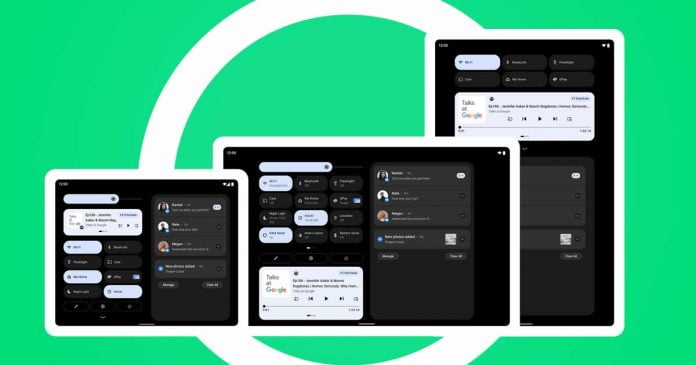
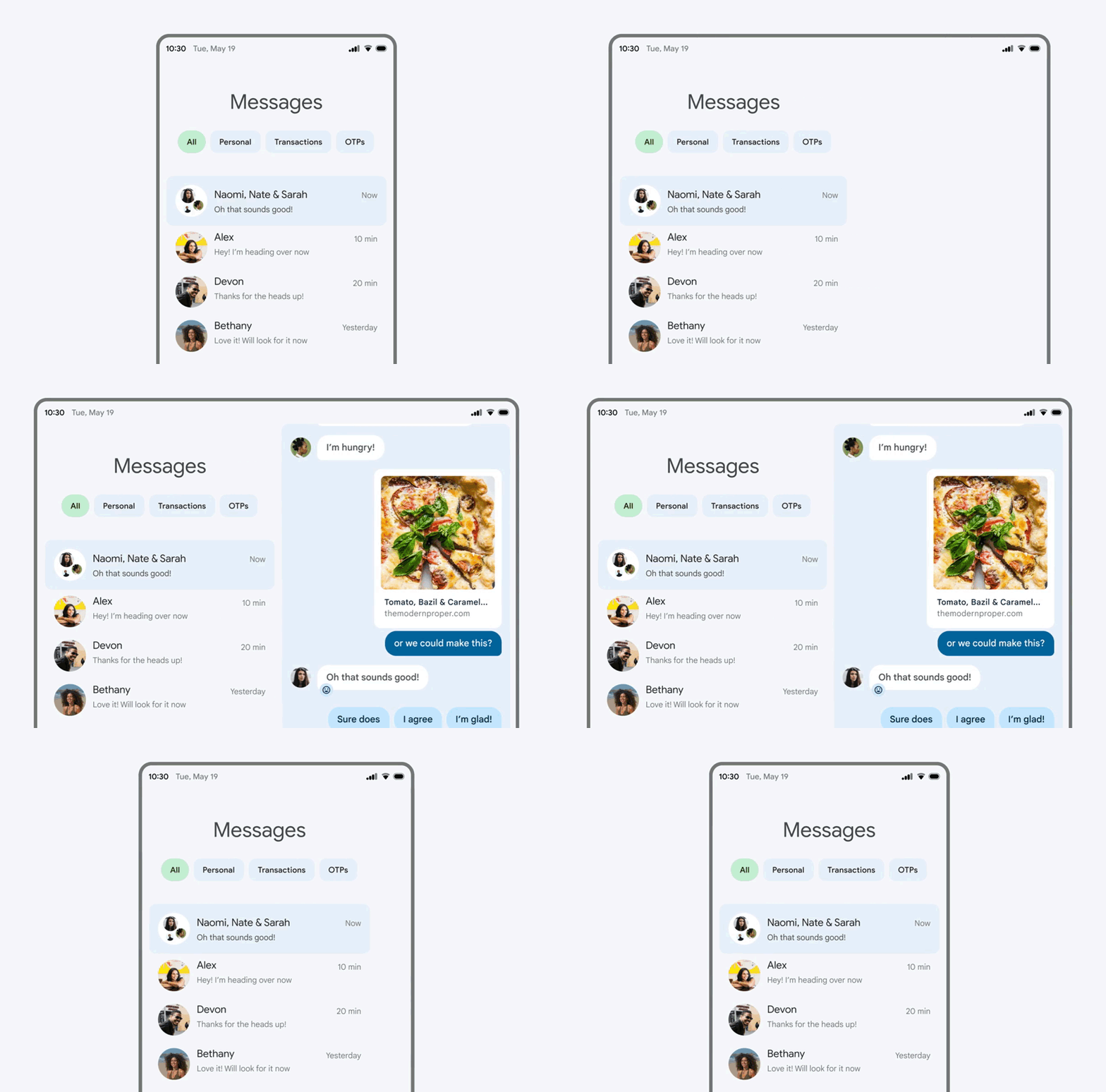
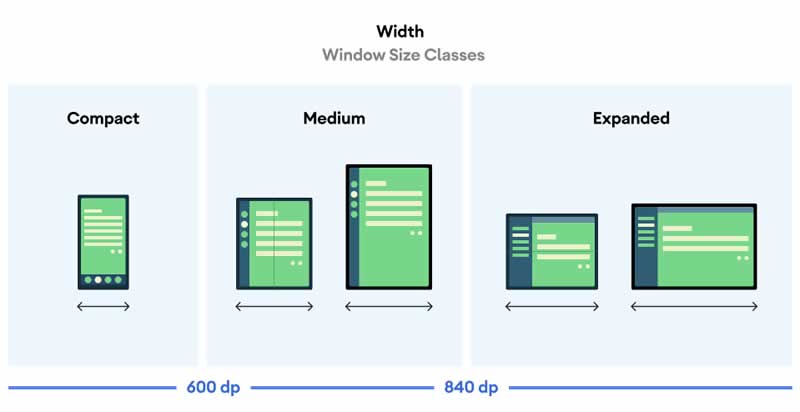
Android 12L is primarily intended to adapt the user interface of the operating system to the larger space available. The first point to note is that Android 12L includes a double-column layout for the notifications section and the lock screen. As Engadget explains, this is activated when the operating system detects that the screen size exceeds 600 dp in width.

Android 12L for tablets

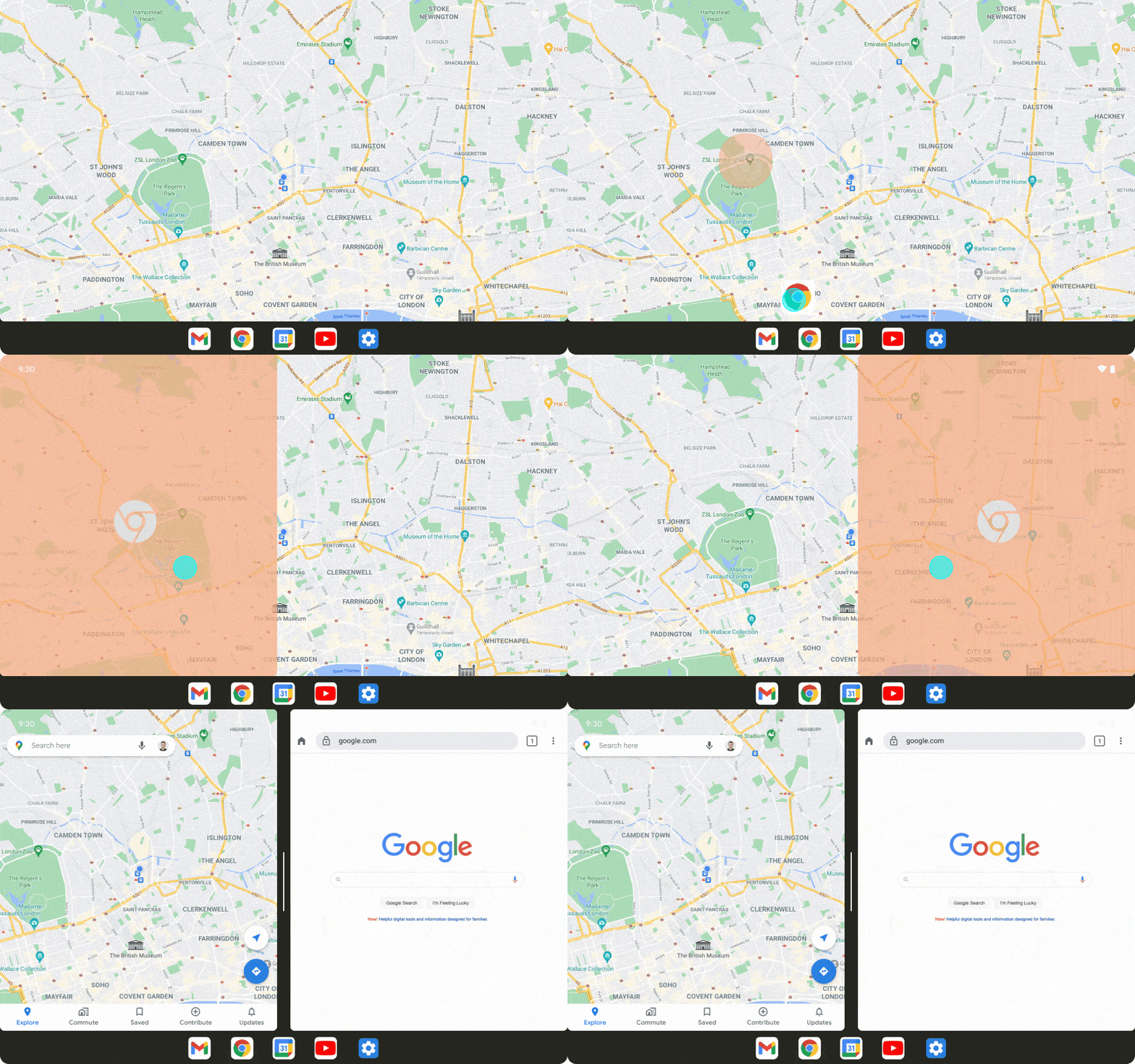
Multitasking is to be simplified thanks to a new taskbar — there, users can store frequently used apps and simply call them up. If an app icon is dragged onto the display, the application can be used in split-screen mode. This means that two apps can be opened at the same time much more easily than before.

All apps can be used in split-screen mode – regardless of whether the applications are originally scalable or not. So Google advises developers to check that their apps look and work well in split-screen mode.

If Android 12L is installed on a normal smartphone, the system should behave like a normal Android 12. The special functions for larger devices are then simply deactivated.

Android 12L is not Google’s first Android version for tablets — in February 2011, the company introduced Android 3.0 (Honeycomb), which only ran on tablets. In recent years, however, Google has severely neglected Android development specifically for tablets — unlike Apple, which has been offering a specially adapted version of iOS with the iPadOS for several years.

7 Websites Every Freshman Should Know About

online writing service

So, you have finally said goodbye to your high school, and now you are pumped up to start an entirely new phase of your life. Being a freshman, you must be experiencing a rollercoaster of emotions – excitement, nervousness, uncertainty, and whatnot.

We know that college life is not all roses. Apart from flings, friendships, and frolics, you will also have to come across issues like attendance, assignments, academic performance, and so on. 

Sounds scary? Well, we have some websites to ease it for you!

Websites and Tools to Your Rescue

Your freshman year brings you numerous opportunities. If you tap these opportunities wisely, your entire college life will turn out to be fruitful. We understand that it gets difficult to balance both academic and personal life at such a tender age.

But where there is a will, there is a way! Your generation is truly lucky to be born in a tech-savvy era. There are uncountable tools and websites meant just for you to make your freshman year a bit more breathable.

Why use the Internet just for Netflix and YouTube? You can instead use it to explore these websites and ease your everyday tasks. Moreover, when you use such websites regularly, you can definitely notice a gradual improvement in your academic performance.

These websites and tools have been designed by experts who put themselves in your shoes before coming up with the solutions. These tools are highly innovative, informative, and time-saving and can help you excel in your academics without making you feel burdened. 

Let us share with you some of these amazing websites that can simplify your freshman year to a great extent.

Top 7 Websites Suitable for Every Freshman

EssayWritingService

The purpose of this coursework service is to help you in writing your college assignments. Professional essay writers offer active assistance to you so that you can complete your assignments easily. 

There are experts in different subject areas and topics. They will guide you at every step, offer valuable suggestions and reviews. As a result, you can significantly improve your assignment quality with this essay writing service. 

ColdTurkey

There are heaps of social media apps to keep you distracted all the time. Unfortunately, no amount of determination can stop you from scrolling through your favorite apps and websites. But we have a digital solution to keep your digital distraction at bay.

ColdTurkey is a popular productivity tool among students. It helps you block games, apps, Google searches, or even the whole of the Internet. Set your time limit while taking a break from studying. Once the limit is over, ColdTurkey will block all the apps that you have enlisted. Also, to keep you encouraged throughout, the tool comes up with motivational quotes.

Coursera

Upskilling is one of the best things that you can do throughout your life. Coursera can help you with that. This website brings to you Massive Open Online Courses (MOOCs). Most of these courses are absolutely free. You can get enrolled in any of these as per your requirement. All you need is a device with access to the Internet. 

Each of the courses has a duration of about 4 to 6 weeks. Once you enroll in any course, you will get access to discussion forums, high-end study materials, instructional videos, and more.

Canva

Do you need to add a graph or table to your research paper, but you do not have enough time to format the graph? Canva can simplify your task. Use this tool to create professional-looking graphic representations of your data in just a couple of minutes. 

Canva offers more than twenty templates for graphs. Choose the one you like, add the data, and then make adjustments in colors and fonts. The feature of drag-and-drop makes the entire process quite easy. 

Evernote

Keeping up with piles of class notes can be quite frustrating. Instead, use Evernote and forget fidgeting with notes and files. It is a safe and secure platform where you can store your files, voice memos, photos, etc. Also, you will be glad to know that this tool is compatible with Siri and Google voice assistants. You can also share these notes with your fellow students who do not have an Evernote account. 

Insight Timer

Freshman year can be quite stressful. You may find it frustrating to juggle your personal and academic life on an everyday basis. But maintaining mental health is as necessary as staying in shape. Meditation can bring great relief to your exhausted mind. 

Insight Timer is an amazing tool that can help you with regular meditation. It has a vast library of over 30,000 titles that can calm and soothe your mind. Set timers as per your convenience so that you can make meditation a daily part of your life. 

myNoise

Unable to focus on your studies because of endless chaos and noise all around? Try myNoise to boost your productivity by listening to your favorite audio. For instance, listen to the whisper of gusting winds when you are sitting in a noisy environment. Or you may use the Gregorian chant to block out all the noise. 

This app also helps those who have trouble sleeping. Listen to the pitter-patter of raindrops or the chirping of cicadas in the forest and slowly slip into the world of slumber.

Summary

College is perhaps one of the best times of your life. Ensure you make the most out of this golden phase. Keep making memories, and at the same time, do not lose your focus. Explore these websites and tools, and use them to make your freshman year more productive. Amidst endless fun, enjoyment, and laughter, these tools will help you stay rooted. Strike the right balance and enjoy the best of both worlds.

Intel Unveils 12th Gen Alder Lake Processors For PC

12th Gen Intel Core processor

Intel has officially introduced the first products corresponding to the twelfth generation of the company’s processors — known internally as Alder Lake

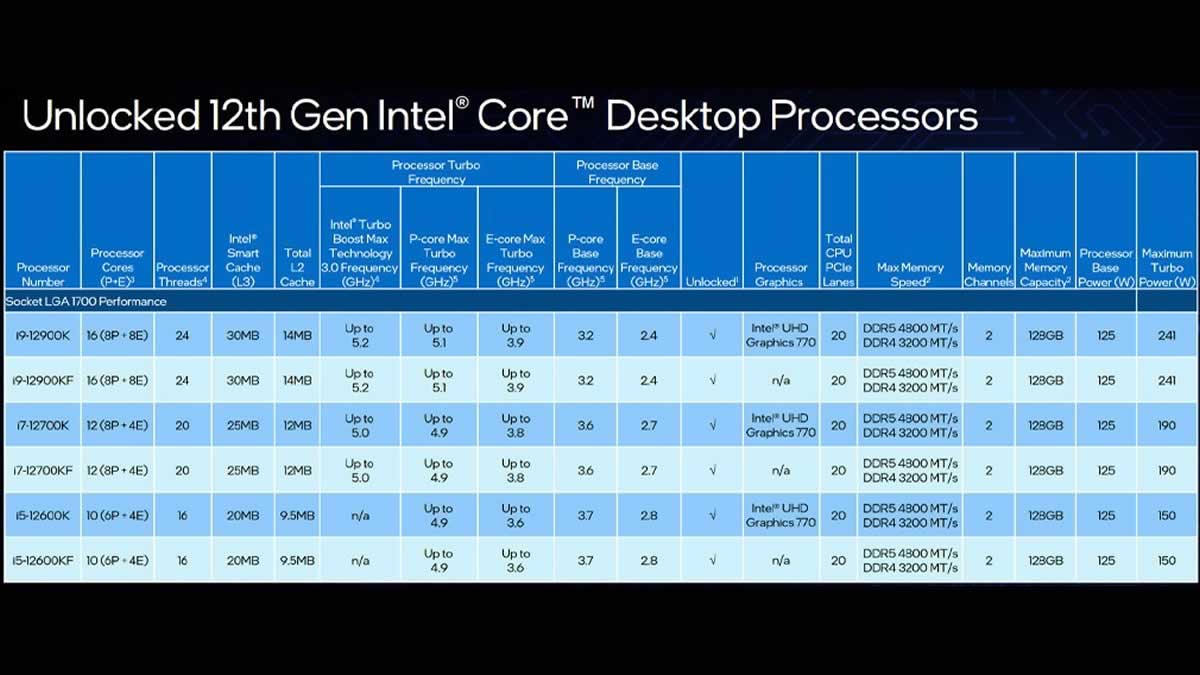
As expected, initially, only the flagship models of the three lines — Core i9, Core i7 and Core i5 — were offered to users. These are, respectively, Core i9-12900K and Core i9-12900KF, Core i7-12700K and Core i7-12700KF, Core i5-12600K and Core i5-12600KF. The 12th Gen Intel Core family will include 60 processor models that will be part of more than 500 PC designs from the company’s partners.

Note that 12th Gen Intel Core differs from all predecessors in a completely new microarchitecture, in which there is a division into large and small cores — similar to mobile platforms for smartphones and tablets. According to the company, this is the biggest architectural change its chips have undergone in a decade. 

Intel has finally moved away from using a 14nm process technology in the desktop segment — for the first time in 6 years. In 12th Gen Alder Lake processors, the new hybrid architecture, pioneered with Intel 7 process (10 nm Enhanced SuperFin process) technology, delivers scalable performance for processors ranging from 9W to 125W. This allows them to be used in all segments of the PC market — from ultra-thin and light notebooks to enthusiast desktop systems, and even in networked peripherals.

12th Gen Alder Lake hybrid architecture

In the hybrid architecture, the Performance-cores (P-core) are specially designed to support the fullest workload in both gaming and daily productivity. In the same way, the Efficient-cores (E-core) will take care of all those secondary processes that do not require a high processor power but instead do their work with a really tight energy consumption. The company has assured that the new architecture will increase performance by 19% compared to the 11th generation processors.

The most advanced versions, starring the Intel Core i9-12900K and i9-12900KF, have a total of 16 cores divided into 8 Performance cores and another 8 Efficient cores with a maximum combined clock frequency of up to 5.2 GHz with the technology. Intel Turbo Max Technology 3.0. Separately, the Performance cores go up to 5.1 GHz and the Efficient ones at 3.9 GHz. The 11th generation had a maximum speed of 5.3 GHz, but without a hybrid core scheme.

The Core i7-12700K and Core i7-12700KF has eight productive and four energy-efficient ones, the Core i5-12600K and Core i5-12600KF have six productive and four energy-efficient ones.

The L2 cache has been increased in all models of the series and is 1.25 MB for high-performance cores and 2 MB for energy-efficient cores. L3 cache is available for all cores — its volume ranges from 30 MB in the Core i9-12900K to 20 MB in the Core i5-12600K.

12th Gen Alder Lake Processors

12th Gen Intel Core processors will require a motherboard with the latest Z690 chipset, which supports Wi-Fi 6E and USB 3.2 Gen 2×2 data transfer protocol. The processors will also be able to work in conjunction with DDR5 RAM. Pre-orders for the new processors have already opened and will go on sale on November 4th.

Now You Can Transfer WhatsApp Chats From iPhone To Android

Transfer WhatsApp Chats From iPhone To Android

One of the great novelties that WhatsApp recently released was the transfer of Chats between devices of different operating systems. But the availability of this function was limited to some Samsung devices.

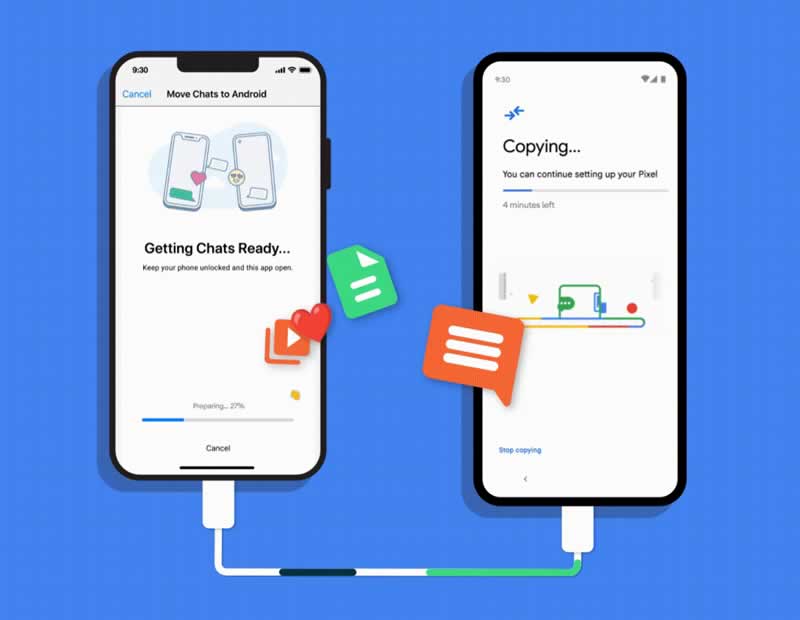
Now WhatsApp and Google have announced the transfer of Chats between iPhone and Android is also extended to all Pixel smartphone models, including recently launched Pixel 6 and Pixel 6 Pro, and devices that updated to Android 12.

transfer of WhatsApp chats from iOS to Android

Keep in mind that the availability of this feature depends on whether the manufacturers update the smartphone to Android 12, so compatibility is now limited only to the Pixel and Samsung. It is hoped that as soon as OEMs begin to update the devices, the list of mobiles compatible with this function will expand.

How to transfer WhatsApp chats from iPhone to Android

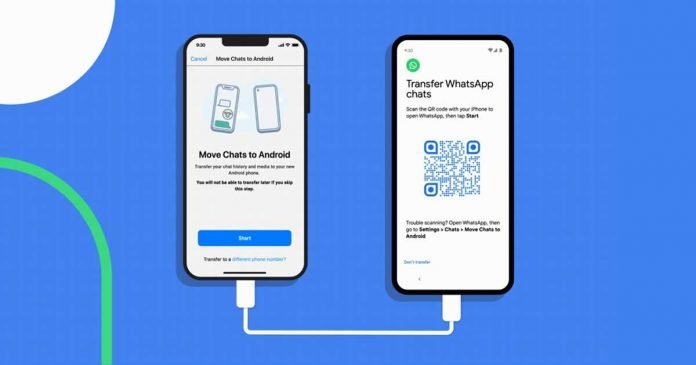
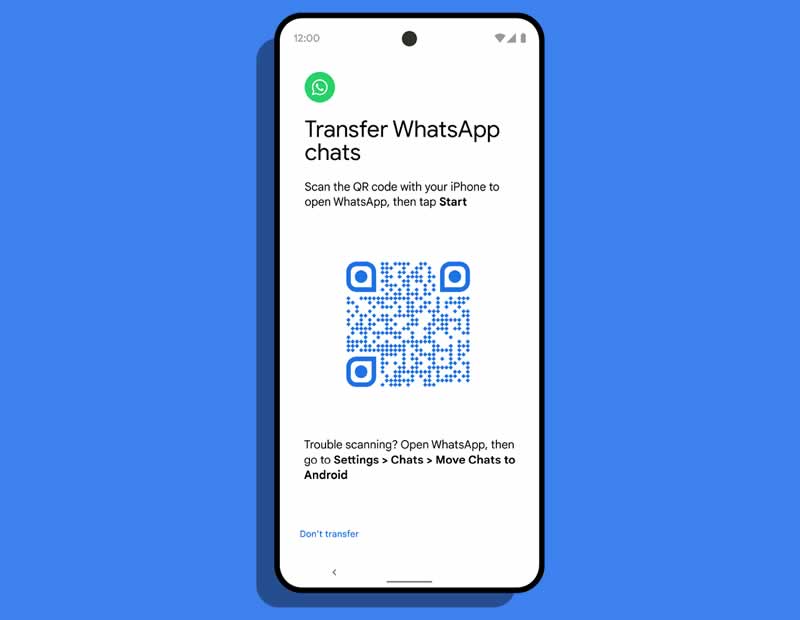
A USB-C to Lightning cable is required to initiate the process during the initial setup of the Android smartphone. During the setup process, the user is asked whether WhatsApp data should be transferred from an iPhone. This process can be started via a QR code displayed on the Android smartphone, which must be scanned with the iPhone.

The functions can be found on iOS under “Settings → Chats → Move Chats to Android“.

How to transfer WhatsApp chats from iPhone to Android

The transfer of WhatsApp chats from iOS to Android simply copies all your conversations, media and more to your new device. That is, it does not permanently erase WhatsApp content from the iPhone or iCloud, something that will have to be done manually as the iPhone will retain all personal information even if the chats have been transferred, as well as the backup copies.

As Google explains, the data remains “protected” during this process. This suggests that the messenger’s end-to-end encryption is maintained during the transfer.

7 Best Freemake Video Converter Alternatives

Video editing articles and news

Freemake Video Converter is a desktop program for converting videos. It has a user-friendly, convenient interface and features that can cover most common user’s needs – converting audio and video files, simple editing options like cropping and cutting, and even burning files to the DVD. However, this program may not suit all of the users due to multiple limitations of the free version.

In this article, we have collected the best variants of programs and online services that can help you if you need to convert some files but are not ready to buy any software.

Best Freemake Alternatives

1. HandBrake – The Open Source Video Transcoder

HandBrake – The Open Source Video Transcoder

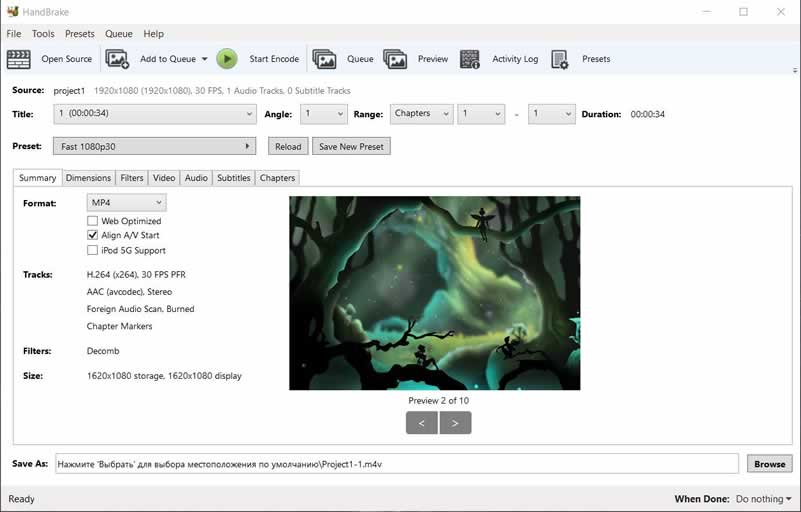
HandBrake is a desktop program for converting videos. It is very intuitive and easy to use; you just need to upload your files into the program, choose the output format, and change some settings if needed. Basically, you can only choose the format you need and start converting. Still, you can also change the dimension, apply filters, rotate your video, adjust FPS, change codecs and bitrate for video and audio separately, and add subtitles. If you want to convert several videos, you can save the settings you need as a preset and then just apply this preset to other files.

The program is absolutely free; there is no need to buy a license. However, there is one disadvantage – technical support is not provided; you can join the community and visit the forum if you need any help with the software.

2. Online Video Converter – Convert Your Videos Online for Free

Online Video Converter – Convert Your Videos Online for Free

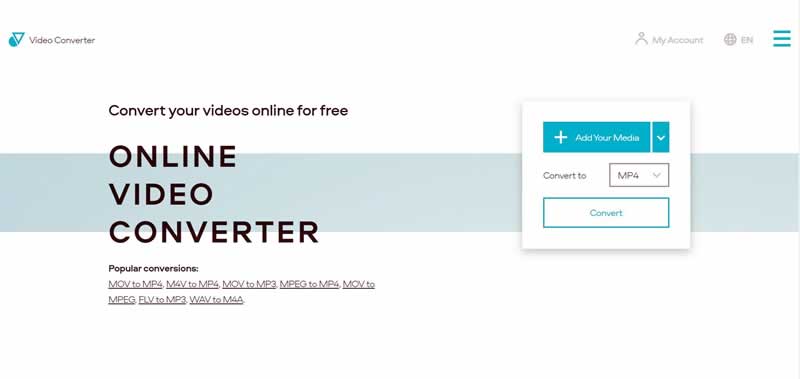
Online Video Converter is a service that allows you to convert and compress video and audio files. There are possibilities to convert video to video, video to audio, audio to audio, and audio to video. The converter supports more than 40 various popular formats of media files. Before starting the conversion, you can adjust the quality for video and the bitrate for audio; also, you can convert only a specific fragment of the file, not the entire one. The conversion is super fast due to the powerful servers of the service. One more advantage – you can upload media files not only from your computer but also from Google Drive and Dropbox.

The converter is absolutely free for processing files up to 100MB. If your files are larger, it is worth thinking about paying a small fee to use this service. In case if you have some problems with the converter, you can submit a ticket to the Support Center. Technical support is provided in several languages, including English, German, French, Italian, Korean, etc.

3. Format Factory – Free and Multifunctional

Format Factory – Free and Multifunctional

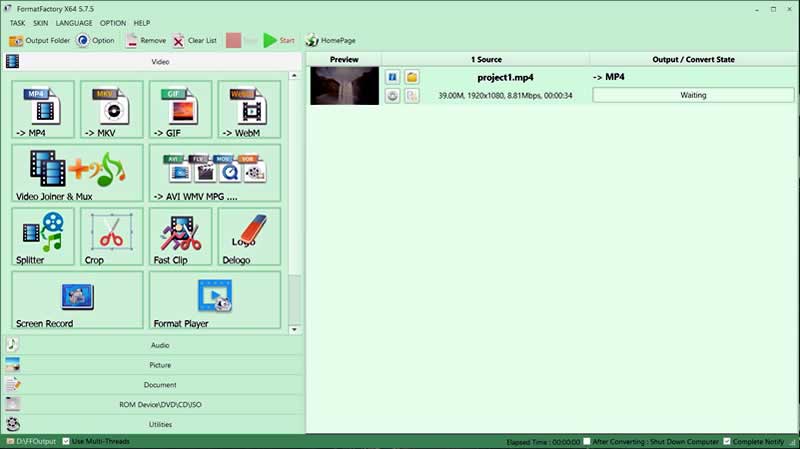
Format Factory is an all-in-one desktop program that combines audio and video converter functionality, video editor, and screen recorder. The program interface is intuitive and straightforward; you can drag and drop your files (video, audio, or images) into the open window of the program, set the parameters you need, and start the conversion. If you want to edit your files, you should choose the tool you want to use at the left panel, then add the file you want to edit, and make changes. The program offers more than 10 different tools for different media files and supports more than 20 media formats.

This software is absolutely free. Technical support is available via email in English and Chinese.

4. Pazera Software – Free Video and Audio Conversion

Pazera Software – Free Video and Audio Conversion

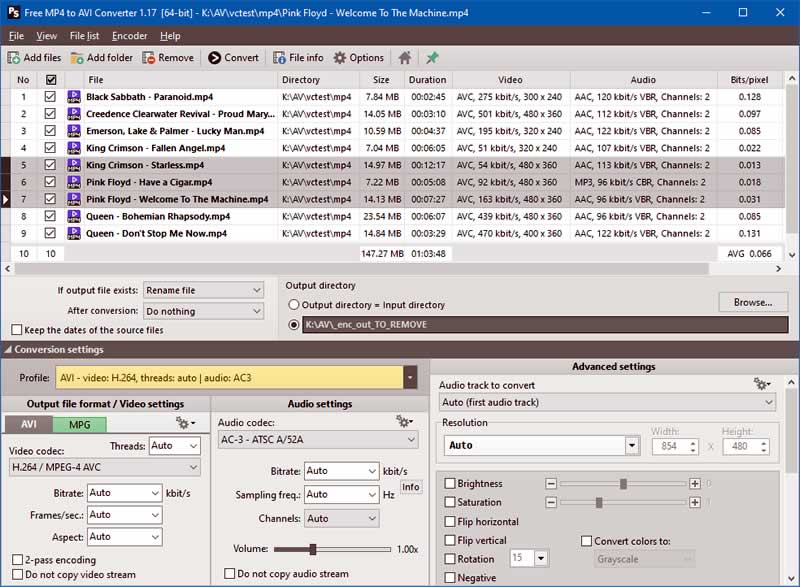
Pazera provides a number of utilities for converting media files. The main disadvantage is that you will have to download and install a particular utility for each specific need. For instance, to convert a video from the MP4 format to the AVI format, you need to download one program, and to convert a video from AVI to MP4, you will need to download another one. Except for this inconvenience, Pazera Software is easy to use and functional. You only need to upload your files into the program, adjust parameters, such as audio and video codecs, bitrate, volume, etc., and start the conversion.

Utilities by Pazera are free; however, if you enjoy them, you can donate. Technical support is not provided, but you can have a look at tutorials.

5. FreeConvert – Easily Convert Your Videos Online

FreeConvert – Easily Convert Your Videos Online

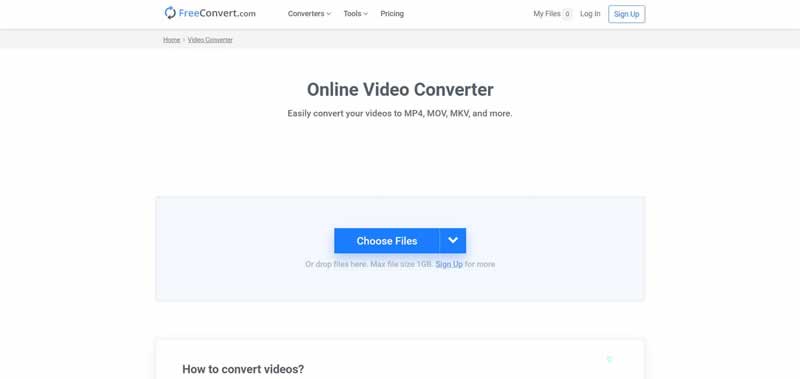
FreeConvert is an online service that lets you upload files from the computer, Google Drive, Dropbox, or URL. Besides converting audio and video, this service offers such editing functionality as changing video and audio codecs, adjusting audio bitrate, setting screen size, aspect ratio, and frame rate for videos, cutting, rotating, and flipping videos, adding subtitles to a video, adjusting audio volume, muting a video, and fade-in and fade-out effects for audio. The converter supports more than 60 popular media file formats.

You can use FreeConvert for free if the size of your files does not exceed 1GB. Otherwise, you will need to pay for a subscription. If you experience any problems with the service, you can contact the Support Center by submitting a ticket.

6. Movavi Video Converter – Get the Ultimate Video Converter

Movavi Video Converter – Get the Ultimate Video Converter

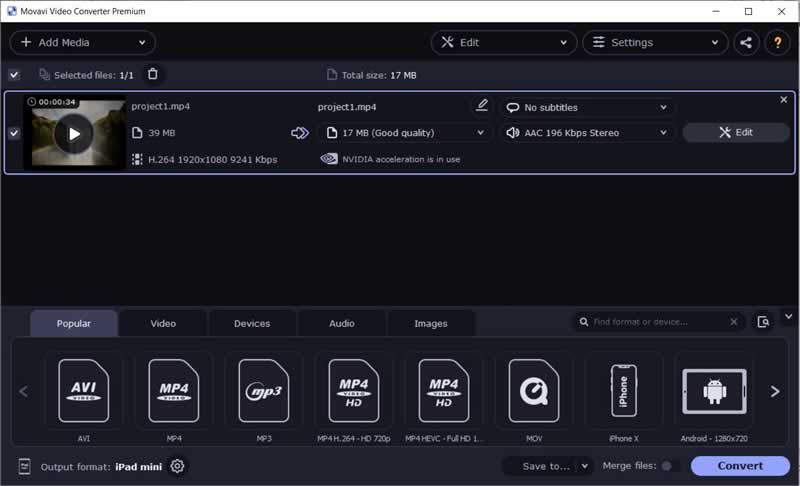
Movavi Video Converter is a multifunctional desktop program that allows you to convert video files to other video and audio formats. This converter supports more than 200 popular media file formats; also, there are built-in presets for various devices and social media. Besides these, Movavi Video Converter offers quite many editing options like cutting, cropping, and rotating a video, stabilization and colors adjustment, applying effects and filters, adding your watermark to a video, adding subtitles, and adjusting the audio track.

You can use Movavi Video Converter for free. However, the trial version of the program has several restrictions like a 7-day trial period, the watermark on the converted video, and the ability to convert only half of your file in the SuperSpeed mode. In case of experiencing problems with the software, you can submit a ticket to the technical support, which is available in multiple languages, including English, German, French, Korean, etc. The official website also offers a huge variety of tools like HD screen recorder, photo editor, and some more.

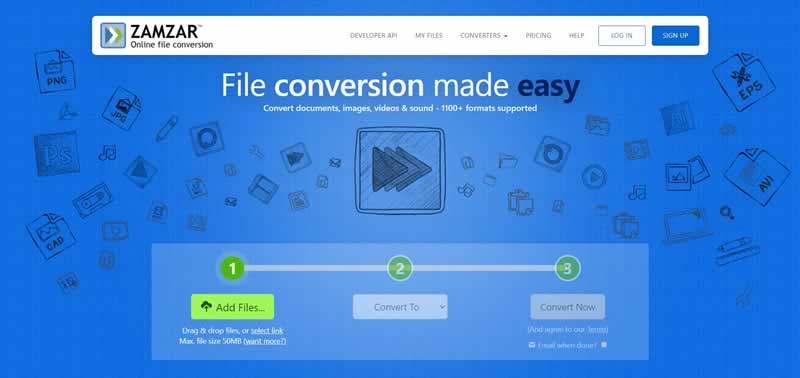
7. Zamzar – File Conversion Made Easy

Zamzar – File Conversion Made Easy

Zamzar is an online converter that allows you to convert video, audio, images, and documents. The service supports more than 1200 different formats of files. You can convert your video to audio, video of another format, or a GIF file. You can also use presets for popular devices and social media. After uploading your files and choosing the format you need, you can start the conversion immediately.

Zamzar is free for converting files up to 50MB. If your files are larger, you will need to pay for the subscription. In case if you face any problems converting your files, you can contact the Support Center via email.

Conclusion

The market offers a number of various desktop and online media files converters today. Whether you are a Windows, a Mac, or a Linux user, you will be able to find the best variant personally for you. We hope that this article will help you to make the best choice.

Aging Facebook: Facebook’s Services Are Hardly In Demand Among Teenagers

Aging Facebook

New leaked Facebook documents reveal that the social network is losing steam among teenagers.

According to The Verge, new internal reports, shared by a company researcher to his co-workers, make it clear that teenagers and young adults are losing interest in the platform. Documents that break down alarming figures, which reveal the target group that is less and less interested in the company’s services.

These documents, signed and presented by a researcher to other colleagues in the company, assure that since 2019 the percentage of adolescent Facebook users has dropped by 13%. In the future, this document expects the figure to fall 45% more in the next two years, causing a general decrease in users on a daily and monthly basis.

TikTok, Clubhouse and many other social networks aimed at young people have stolen prominence from Facebook.

The most surprising thing is that this fight is not just about Facebook. The problem has penetrated deep into the company, and for example, this same trend is being seen on Instagram. Those under 17 years of age and older are beginning to reduce their interaction with Instagram, despite how popular the application is and more than 60% of users who start their account do so privately.

The documents of this internal study also show the first ideas with which Facebook wants to counter the trend. Among other things, the company wants to greatly improve its group pages, offer new job search options via Facebook and introduce so-called mood feeds — and most importantly, Facebook is planning to rebrand the company with a new name.

According to a presentation by Facebook’s chief product officer, Chris Cox, most young adults “perceive Facebook as a place for people in their 40s and 50s. Young adults perceive content as boring, misleading, and negative.”

Reels of Instagram or WhatsApp, and Messenger are just some of the responses that Facebook has been putting on the table to respond to TikTok and the rest of the applications that have been assuming great competition for the company.