Home Blog Page 134

Musk Planning to Bring Back the Original Short Videos Creator, Vine

Musk Planning to Bring Back Vine

Elon Musk could task the Twitter developers to recover one of the services abandoned by the company, Vine, which started the trend for short videos.

Every social network wants to be TikTok, or at least do what TikTok does — attract a new, younger audience. It is not surprising that the app stores have been filled with clones or that services like Instagram have focused on their versions, such as Instagram Reels or YouTube Shorts.

Only a few people know that TikTok didn’t invent the concept of short videos. There was already a successful app which opted for short videos as a quick and easy way to connect with the audience, and that’s Vine.

It was an app for sharing short videos, no longer than six seconds. Twitter bought that in 2012. Many of the memes and viral videos shared on Twitter and YouTube today were first published on Vine, and many of its creators found fame on other platforms.

We know that Vine was ahead of its time, but in 2016, it was no surprise that the service was shut down. Twitter was going through a rough patch — its co-founder, Jack Dorsey, had returned to a company desperate for growth and revenue streams. In that context, the closure of Vine was a way to control spending, but in hindsight, if it had lasted a couple more years, perhaps it could have attracted the same users as TikTok. But it’s hard to say if Vine can be successful if it makes a comeback now.

Elon Musk seems willing to take a risk. He ran a poll on his account, asking his followers if they wanted Vine back; the responses were mostly positive, with 69% of the votes. The possibility that Twitter could fight TikTok with Vine will be interesting to see, but it won’t be easy.

According to Axios, Elon Musk has set a deadline for the developer team to bring Vine back by the end of the year; however, we must remember that the development of Vine was stopped six years ago. The Vine source code is unlikely to be exploitable as it is, so it would be better to develop it from scratch for a new platform. And that means spending more money and hiring more employees, both of which Musk doesn’t want to do.

Google Chrome Will Now Save RAM And Battery

Chrome Save RAM And Battery

According to Android Police, the Google Chrome browser will soon acquire two new features. Google will teach Chrome how to save RAM and battery with the new Memory and Battery saver feature. Google wants to fix this 14 years after the first version of Chrome was released.

Two new modes will immediately appear to save RAM and battery, currently being tested by developers and beta testers. They are called Memory Saver and Battery Saver, and everyone who uses Canary builds of the browser can evaluate their effectiveness. 

Memory Saver mode, as its name indicates, will help reduce RAM usage. The second, Battery Saver, is designed to save battery power and is aimed at laptop users. However, its algorithms also affect background tabs.

The Memory Saver mode, in its current form, puts all background tabs to sleep. They do not close, but any activity stops until the user clicks on them.

With the new update, Google will allow users to turn on tab freeze mode without tedious navigation through the settings menu. Also, users can customize this option by selecting tabs that will continue to update in the background. For example, if YouTube or some podcast is open on a tab, you can make it work in the background.

If the Memory Saver tries to solve the issue of saving RAM, then the Battery Saver mode should help the laptop discharge more slowly. It blocks the updating of background tabs, which reduces the load on the laptop’s hardware and, as a result, lowers the charge consumption.

Google has been fighting Chrome’s appetite for RAM for years. In October 2019, it already implemented memory freezing algorithms, somewhat different ones. As practice has shown, the idea did not work.

Although the main changes are Memory and Battery Savers, other updates include changing how the virtual keyboard is displayed in Chrome. Typically, when the keyboard is displayed in Chrome, the browser resizes the visible portion of the website. In contrast, on iOS, the virtual keyboard slides over the displayed page content and is placed at the bottom of the screen. The new version of Chrome implements both options for displaying the keyboard, and the web pages themselves can indicate which one should be used.

Another improvement is the new COLRv1 font format, which allows you to add bright fonts, such as colourful emoji, to Chrome without taking up much memory. The changes are currently available in Chrome 108 beta.

Twitter To Charge $20 Per Month For Blue Tick

$20 per Month For Twitter Blue Tick

After the acquisition of Twitter by Elon Musk, Twitter’s new era of masks began. The platform first reported on Sunday that Twitter might soon conduct a verification of the Twitter Blue feature while quadrupling the cost of the subscription service. Users will be charged a $20 monthly fee to keep their blue tick.

The Verge also reported that Twitter Blue subscription prices have gone up from the already $4.99 monthly cost to a whopping $19.99 per month. It’s the same price as Netflix’s premium subscription but with significantly less content.

Due to Twitter’s proposed change, those who haven’t verified will buy the essentially coveted blue tick badge. Twitter only posts verified status from high-profile accounts, “prominent individuals or brands.” If the change is made, it will likely be possible to verify anyone who meets the other two criteria of being active on Twitter and verifying their identity.

Once Twitter’s new policy goes into effect, users can subscribe for 90 days or lose the blue tick. It is unclear at this time what happens to verified users in countries where Twitter Blue is unavailable. 

Twitter Blue now allows users to edit tweets, upload videos in 1080p and see the most shared articles on the network. Use an NFT as your profile picture because if you’re paying for Twitter means you’re also interested in crypto.

It’s annoying that features like editing aren’t simply included in Twitter’s default product, but at least they’ve always been paid features. Musk’s proposal to change Twitter’s verification system would lock previously free features behind a paywall.

In addition to being extremely unpopular with these changes, the way Musk seems to be trying to implement them also doesn’t get him many friends. According to Engadget, Employees at Twitter were informed they would be sacked if the new Twitter Blue pricing and verification system is not implemented by November 7. Work-life balance on Twitter has probably taken a big hit.

Musk seems to think the change to Twitter Blue will help increase the company’s profits. Still, if Twitter were to make verification a paid feature, many accounts would likely revoke their verified status without regret.

Everything You Need to Know about Amazon Renewed

Amazon Renewed

As one of the world’s largest online selling platforms, Amazon provides many different products for its customers. And at some point, you have probably met the term Renewed in the marketplace. 

So, what is Amazon Renewed?

It’s the marketplace’s program where clients can find refurbished items and pre-owned goods from famous brands at attractive prices.

This blog post will explain what Amazon Renewed is and how it works. We will also examine the main benefits of shopping with this program and why sellers should consider using it.

Keep reading to learn more!

What Is Amazon Renewed?

It is an Amazon solution developed to help you move like-new items to AMZ customers across the globe. It includes those goods that have been refurbished, repaired, and tested to ensure they function like new. Refurbishment usually includes a diagnostic test, substitution of deficient parts, fine inspection and cleaning, and repackaging if necessary.

It’s an excellent opportunity to expand your business on AMZ! Here’s why:

  • Increase recovery rate for returned goods and earn more revenue.
  • Appeal to a more extensive, more value-conscious client base.
  • Boost product exposure via complimentary AMZ Renewed marketing drivers.

Goods from the following categories may be considered for sale with this program:

  • Cameras
  • Headphones
  • Phones
  • Power Tools
  • Kitchen Appliances
  • Personal Computers
  • Television
  • Tablets
  • Video Game Consoles

Please refer to the AMZ Renewed program policies on the website for a complete list of items allowed for sale.

Amazon Renewed: Product Categories

There are three main types of “used” items on the Amazon Renewed program:

  • Open-box: Those are unused items with an open package. We have all purchased a product that didn’t meet our expectations and that we ended up being too lazy to return. So, why not benefit from it?
  • Pre-owned: Still probably used. These products tend to be more satisfactory than refurbished products and thus have a long service life.
  • Refurbished: Such items may have been flawed. In this case, the merchant should fix the goods. Another reason might be that the client did not need the item anymore by the time they received it and chose to return it.

Amazon Renewed: Requirement to Participate

You will need to meet the below criteria to become part of this solution:

  • You must be a registered AMZ merchant with an Order Defect Rate of less than 0.8% and more than 70 orders within the previous 3 months.
  • Provide information about your experience in providing refurbished goods, like sales data.

Does College Degree Matter in Cybersecurity?

Cybersecurity trends

According to credible statistics, many cybersecurity jobs require a university degree. Depending on where you live, demand for degreed cybersecurity specialists may vary. In some countries, it is a must, whereas in others, employers are more flexible.

With the current trend of quitting college in favor of getting full-time jobs, it would not come as a surprise to see lots of students opting for a job. The rationale for this is that you might want to start building hands-on, practical experience benefiting from on-the-job training, real-life challenges, and professional networking opportunities.

The above is important because some students feel like if they keep studying for four long years, they will be allowed a huge head start over their competitors. Also, their learning might be obsolete by the time they graduate. Let’s explore this further to see if your college degree really matters in the cybersecurity domain. The best way of doing this would be to look at the related pros and cons.

Does a degree mean more salary?

Conventional wisdom has it that with a degree, you are likely to get a better and higher paid salary when you embark on your professional career. Some studies corroborate this, claiming that with a bachelor’s degree, you increase the odds of getting your plum job 13 times.

But this is not as clear-cut as these sources suggest. It boils down to which country you put in your application. In some countries, tradition tends to define salary levels. In others, it is more arbitrary.

It also depends on how much you should invest in your college education in terms of both time and money investments. Some colleges make it really hard on students. That is the reason many students decide to pay for research paper writing. This enables them to hire professional writers to complete their college assignments and tasks on time, to the highest quality standards, and at reasonable rates.

What do employers think?

This is where it becomes a bit tricky. A lot depends on where you apply and which companies fall within your scope of interests. Some employers have more stringent requirements, while others are more flexible. Usually, more traditional and conservative groups would specify their education requirements in job adverts. This is handy because it gives you a clear idea of eligibility.

Some surveys suggest that more than 80 percent of employers think that more than half of applicants for cybersecurity jobs are generally qualified for the advertised jobs. They don’t always consider degrees as a plus.

Others don’t even look at your resume and credentials. They base their decisions on in-person interaction and on-the-spot tests. For them, your potential, familiarity with a broad range of gadgets and tools, ability to adapt to changes, learn new things, and resilience mean far more than your degree.

Better off without a degree?

A clear advantage of foregoing a degree program is that you dive into practical work immediately. No need to get a handle on theory and history. An array of real-life challenges and tasks hit you, and there is no way around them other than taking them on.

Thus, it becomes imperative to work and learn as you go. You gain experience through problem-solving. You might not always be able to structure your knowledge in an organized manner, but that should not be an insurmountable obstacle. There is always an opportunity to take online courses to formalize your hands-on experience. When push comes to shove, what matters is your ability to accomplish specific tasks rather than your formal degree, which may or may not be relevant to emerging priorities.

Work experience also seems to make you eligible for an increasing number of vacancies. When you rack up a minimum of 3 years of working experience, you become eligible for over 30,000 positions in the field.

Those who decide to stick to college studies must be prepared to deal with tight deadlines, recurring tasks and assignments, and a considerable workload. The good news is that you would not have to go it alone. Because there are lots of online writing companies with a proven track record in providing top-notch essay-writing services to thousands of college students.

So what?

With all the above considerations, you should do your due diligence to consider all options at your disposal and make an informed decision. It never hurts to talk to your peers, alumni, or potential employers. At the end of the day, your decision should be framed and made so as to pave the way for a successful career.

Final Thoughts

The demand for cybersecurity experts is very high these days. Given the rate and pace of digital transformation and the arrival of augmented reality, we will see the demand increasing further in the years to come. One big challenge that students face when contemplating their options is related to getting into a degree program or not.

There is no one-size-fits-all solution to this dilemma. Depending on your location and the requirements of potential employers, you might be better off with a degree in some places, whereas it can put you at a disadvantage elsewhere. The bottom line is that you should carefully consider the pros and cons of both options, scrutinize them in the context of your educational goals and career aspirations, and make an informed decision.

ARM CPU Designs May No Longer Be Combined With Other GPUs Or NPUs From 2025

ARM CPU Designs May No Longer Be Combined

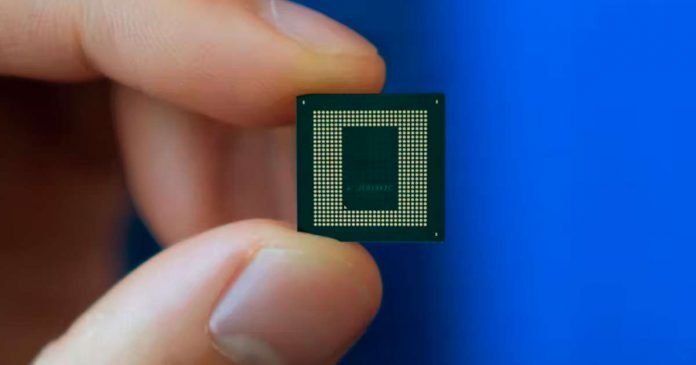
In a lawsuit with Qualcomm, the British Arm decided to change its business model. From now on, license fees should be paid by manufacturers of end devices, including smartphones and tablets. ARM will also prohibit third-party components in chips with ARM processors if they have their counterparts, including GPUs, NPUs and ISPs.

ARM previously sued Qualcomm after it bought server processor developer Nuvia. The British company believes that after this transaction, all previous agreements should be considered invalid since Nuvia developed chip designs using ARM licenses and cannot be transferred to Qualcomm without permission.

ARM also decided to tighten its policy on chip developers, including Qualcomm. If ARM delivers its equivalents as a licenced product, it will no longer be allowed to employ third-party components in single-chip devices using ARM CPUs. This will affect graphics and network processors, as well as image processors. This innovation will affect partnerships between Samsung and AMD and MediaTek and Imagination.

However, the new rules will only affect some. Nvidia has a 20-year license to develop components with ARM architecture, and Apple was at the forefront of ARM. In addition, the innovations will not affect ARM’s cooperation with Broadcom.

In May, Qualcomm confirmed that it would like to take a stake in ARM and help build a consortium to keep the British chipmaker neutral. However, ARM owner SoftBank plans to retain a majority stake in the manufacturer after the IPO. It will be held during the financial year ending March 31, 2023.

Top 5 Operating Systems: Pros And Cons

Operating Systems you need to know

The operating system is why you can use your computer and its many functions. It is the most critical software that runs on your computer. All the inputs you give by using the mouse, keyboard, and other command buttons are interpreted into the computer’s language because of the operating system.

This proves that the operating system is the heartbeat of a computer, without which it becomes useless. When you turn on a computer, various programs will start running simultaneously. These programs need access to the computer’s memory, storage, and Central Processing Unit to function.

There are only five operating systems for your computer, and what you choose will define how your computer functions. Each operating system has its advantages and disadvantages.

So, on that note, let us look at the top 5 operating systems and their pros and cons, which we have made ready together with Shoppok – leader of internet selling in the USA.

1. Windows

Microsoft Windows is the most common of all the operating systems currently available to the public. Microsoft developed the first Windows version in the 1980s, and its popularity has only grown from strength to strength with the release of new versions.

The latest Windows version is Windows 11, which was released to the public in 2022. Windows 7 was a widely-used version by consumers, but Microsoft discontinued the security updates and technical support in 2020.

Though Microsoft Windows is the most popular operating system, it also has its limitations. Let us look at some pros and cons of the Windows operating system.

Pros

  • Since the Windows operating system is used by most people worldwide, hardware developers produce drivers that support Windows.
  • Users find it easy to use the latest updated versions of Windows because Microsoft keeps the User Interface common in all of them.
  • Windows is widely used by game and software developers to develop games, apps, and other software.

Cons

  • The most common problem with the Windows operating system is that the computer freezes when many programs run.
  • When there are technical problems, getting good support from the Windows team is not easy.
  • Most programs in the Windows operating system do not come for free, like the download manager, anti-virus, games, etc.

2. macOS

The Macintosh Operating System or macOS is the primary operating system used in Apple computers. It is an excellent operating system suitable for people who like to get creative with photography, video, and art.

It is compatible with all Apple devices, like iPhones, MacBooks, etc. The latest version of the macOS is the macOS 12 Monterey, released to Apple users in 2021. The macOS is a powerful operating system but comes with a few setbacks.

Pros

  • macOS has a simpler and more streamlined user interface, allowing users to complete their work without complications.
  • People who use macOS are less vulnerable to virus attacks since its UNIX relationship is more secure than other operating systems.
  • People who use iPhones will find it comfortable to shift to macOS due to the identical graphical user interface.

Cons

  • Mac PCs are not budget-friendly and come with fewer hardware specifications than PCs that use other operating systems.
  • You cannot make changes to the hardware in Mac PCs, like the processor, graphics card, etc.
  • Mac PCs cannot run games with high graphics because of their low-graphics capability.

3. Linux

Linux is one of the most-used operating systems in terms of its application on a wide range of systems in phones, cars, television, etc. It is a very powerful operating system that is used in running most of the internet.

Linux is known for its open-source operating system, where people can access its base code and redesign it. The base code is the source of the Linux operating system, and many prominent companies use it to release their operating systems based on Linux.

Its adaptability has been well-embraced and backed by several operating systems and software programs. However, there can also be disadvantages while using Linux. Here are its pros and cons.

Pros

  • You do not require a license to install and use the Linux operating system. Since it is an open-source operating system, you can download it for free.
  • It is more secure from virus attacks because of the lesser number of users as compared to Windows and macOS.
  • You do not need to install anti-virus programs in the Linux OS, which frees up memory space. This gives way to a fast operating system.

Cons

  • Learning how to use the Linux operating system takes patience and time, which can frustrate some people.
  • You cannot use Microsoft applications in the Linux operating system.
  • According to most users, the lack of drivers in the Linux operating system is one of its biggest downsides.

4. Ubuntu

Ubuntu is an operating system created based on Debian, an old distro that was difficult to install. It is one of the distributions of the Linux kernel.

Ubuntu is the most popular Linux workstation platform worldwide for computers and private servers. It also comes with a few setbacks, which we will look at below.

Pros

  • You can use Ubuntu freely for the rest of your life because it is an open-source operating system based on the Linux kernel.
  • Unbuntu is very popular among app and software developers.
  • Ubuntu uses a kernel enhancement called AppArmor, which mitigates the extent of security breaches.

Cons

  • There are not many applications you can choose from Ubuntu, unlike Windows and macOS.
  • Ubuntu is not an ideal operating system for people enthusiastic about playing games with high graphics and advanced gameplay.
  • There are frequent compatibility issues between the hardware and operating system Ubuntu users face.

5. Solaris

The Solaris operating system is a proprietary Unix OS that Sun Microsystems developed. This operating system is used mainly by telecoms, financial institutions, or energy-sector companies.

It is the best OS for Oracle Database and Java applications. Solaris is not a standard operating system used by less than 1% of all websites. Let us look at the advantages and disadvantages of Solaris.

Pros

  • The Solaris operating system can handle many users at a time.
  • This operating system is least likely to face virus attacks because it is fully secure.
  • It is known for having many backup tools.

Cons

  • Though you can install and run Solaris for free, the software updates will cost you some.
  • The hardware support is not as good as the other operating systems like Windows and Linux.
  • The Solaris operating system is not ideal for personal use; primarily designed for commercial and large-scale applications.

Samsung Has Launched ‘Maintenance Mode’ To Protect User Data

Samsung Maintenance Mode

Entrusting your phone to a repairer is often stressful. After a successful pilot program in South Korea and initial launch in China, Samsung has launched the Maintenance Mode — a privacy protection feature for some of its Galaxy devices. 

Maintenance Mode helps alleviate the user’s worry about handing their smartphone to someone for repair by allowing users to restrict access to sensitive information such as images, messages, or contacts. Samsung said in a statement. “Our whole lives are on our phones, from credit card information to family photos. With Maintenance Mode, we are giving extra reassurance that Galaxy users can keep their privacy, even if they hand their phone to someone“.

In detail, Maintenance Mode is a way to create a separate user account called “guest” when the user hands over his device to be repaired. The repairer can then operate the basic functions without being able to access private information. 

To do so, navigate to Settings > Battery and device care > Maintenance Mode > Turn on, then restart your smartphone. As soon as it restarts, users’ personal information, including photos, documents, and messages, will be restricted.

Maintenance Mode main1F

Once the Maintenance Mode is activated, the person to whom the device was entrusted will also not be able to recover the applications installed before. Data or accounts generated while using Maintenance Mode are automatically deleted as soon as the owner exits this mode.

Consequently, the repairer can download applications from the Galaxy Store, but these apps will be automatically deleted along with the data or accounts created as soon as the owner exits Maintenance Mode. The user can use a password or fingerprint to activate or exit it.

To date, Galaxy devices are protected by Knox, the firm’s military-grade security platform, which claims that any potential threat can be discovered and neutralized more quickly. Built-in hardware and software security protect everything on the device. Users also have access to features such as the security & privacy dashboard and permissions manager, so users can easily determine what happens to their data.

General availability by 2023

The Maintenance Mode feature was first tested on the Galaxy S21 series in Korea in July and then launched in China in September. It is to be rolled out gradually to models running Android 13 and One UI 5 — the stable version of its Android 13-based One UI 5 or later, including Galaxy S21 and S22 series. Timing of availability may vary by market and model.