Home Blog Page 201

Log4Shell: Log4j Vulnerability Threatens Cybersecurity Worldwide

Log4j Log4Shell vulnerabilit

The recently discovered vulnerability known as Log4Shell is currently causing chaos on the internet, as cyber defenders try to fix the flaw while cybercriminals try to exploit its weaknesses and steal information.

The Log4Shell vulnerability (CVE-2021-44228) was found in the Apache Log4j library, which was assigned the maximum severity level — CVSS 10. This library is used by millions of Java applications to log error messages. To make matters worse, attackers are already actively exploiting this vulnerability in attacks.

The security breach threatens millions of devices and major services like Minecraft, Steam, and Apple iCloud. Although the vulnerability already has a patch to fix the problem, the bug is expected to take a long time to fix, given a large number of systems and devices that have been affected. Therefore, the Apache Foundation recommends that all developers update the library to version 2.15.0, and if this is not possible, use one of the methods described on the Apache Log4j Security Vulnerabilities page.

The vulnerability appears to have been exploited primarily to deliver crypto mining malware, and security researchers expect to see an evolution in the type of attacks. The ability to easily execute unauthenticated, remote code opens up a wide range of possibilities for attackers.

So far, no major cyber incidents have been publicly documented as a result of the Log4Shell vulnerability, but researchers are seeing an alarming rise in hacker groups trying to exploit the flaw for espionage.

Top 12 Photo Processing Services for E-commerce Products

Photo Processing Services

Many elements of working in an online store need specific attention. The production of product cards, which serve as a replacement for displays in an offline store, is a crucial component.

After a photo session of the products, it is required to participate in the post-processing of images that will draw the attention of prospective customers to make an appealing product. It is vital to enhance the images, but not to overdo it to create an image of the product that would differ in real life when the product is purchased. This will have a detrimental impact on your consumers’ reactions and your brand’s image.

Photo editors involve applying filters, cropping photographs, changing the color grading, and doing a variety of other things. Often, editors discover that the background of a picture is ineffective and opt to utilize the background removal service by Retoucher.Online.

We’ll go through the finest paid and free picture post-processing services in this post.

Photoshop CC

Internet users get access to a massive range of tools, effects, typefaces, automated and manual editing tools, and layout options. It has a complex layer system, a variety of blend options, and much more.

If you are a beginner, most of the features will be utterly useless. Pros, on the other hand, will obtain whatever they need to handle problems of any difficulty here.

Adobe Lightroom CC

It is one of the most advanced picture editors, enabling you to modify all of a picture’s visual aspects. Numerous designers choose this service since it features an extremely simple storage gallery for maintaining a collection of photographs.

The program allows you to process photos on any device and synchronize them. As a result, when you implement adjustments on one device, they are instantly reflected on the others.

Luminar

This paid service has a variety of tools for fast and simple correction of flaws including compression, light scattering, and so on. Users will indeed receive a plethora of effects to change photos of the goods.

Affinity Photo

Many sophisticated capabilities, such as HDR photo merging, 360-degree editing, and batch processing, are included in the current edition. Furthermore, tone mapping allows you to transform any snapshot into a dramatic setting with features you never knew existed.

PaintShop Pro

This program has been a prosperous substitute for advanced services with a high cost. The editor seems faster, easier, and more original in 2021 than it has ever been. It features layering, has all of the useful elements for changing shades and removing aberration, and can convert a wide range of formats.

DxO Photolab

It is widely regarded as the best RAW conversion program. Furthermore, it fixes different levels of deformation, color shading exceptionally well. Users may either import photographs from their laptop and choose parameters, or they can get one of the templates. Within those options, the service produces exceptional results.

Pixelmator

The next option is a powerful and efficient tool. It includes options for modifying tints, brightness, enhancement of dark spots, and intensity parameters. The application includes a plethora of fascinating photo effects. It moreover supports the opening and saving of photos in a variety of leading image formats.

Acorn

The program first appeared 14 years ago and has since offered excellent image processing technology for both amateurs and pros with small budgets. You may find magnificent effects, crop options, and other effective tools for photo processing.

Image editors you need

Free services

Fotor

This editor’s features are sufficient for the majority of professional demands. Colors can be easily adjusted, photographs may be resized, cropped and aligned, and backgrounds can be removed with the help of this editor. The service also includes superb retouching capabilities for removing face imperfections. So if you ever want to customize your shot, there is a diversity of stickers, frames, and other creative elements at your disposal.

Pixlr

Hundreds of various advanced filters and tools are available in this editor. Furthermore, it can be used to conduct any fundamental picture alterations. You will be able to customize tools for your needs and preferences.

Gimp

Gimp is an open-source alternative editor that has a comprehensive arsenal of settings that includes a wide range of filters and color grading options. The specialists made their best so that users can process the most usable photo formats.

Snapseed

Google has created a sophisticated smartphone picture editor. The app has all of the settings required for both rapid and easy picture editing as well as precisely correcting any detail without complications. All of this can be perfectly done using your smartphone.

Conclusion

An online store is a convenient service for purchasing goods, especially during a pandemic. Users must have the ability to review each item in order to make a purchasing decision. This is why it is important to create high-quality product photos and post-process them. You can choose between paid and free photo editors, depending on your budget.

Oppo Air Glass: OPPO Lands In The World Of “Assisted Reality” Eyewear

Oppo Air Glass

Along with MariSilicon X, Oppo has officially presented Oppo Air Glass at INNO Day 2021 — its first “assisted reality” glasses.

Calling them “glasses” is not really accurate, as they are not actual glasses. The Oppo Air Glass is a device that is fitted to the temple of our regular glasses, and that has a Spark microprojector developed by Oppo to project information in front of our eyes.

The smart device is equipped with a cutting-edge micro-LED and a special diffraction optical waveguide display. The Oppo Air Glass allows for four different user interactions — through touch, voice, head movement and hand movement — allowing users to have faster and easier access to the information they need.

Oppo Air Glass features

The company offers a minimalist and very elegant design. The set weighs 30 grams and, according to the Chinese firm, it can be worn like a normal pair of glasses. In this body (manufactured with CNC) we find the battery, the speaker, the processor (a Snapdragon Wear 4100 ) and the Spark microprojector.

The main body design features a touch bar that resembles an elegant feather ensemble. The waveguide monocular lens design is inspired by cicadas’ wings, going against the usual and conventional rectangular or rounded lens designs on eyewear.

This in-house developed Spark Microprojector by Oppo is only 0.5cc in size, roughly the size of a coffee bean, and is one of the most compact projection systems in the industry. The projector features a CNC metal casing with a glass lens module to provide better heat dissipation and stability. The projector is powered by a state-of-the-art Micro LED, with a brightness of up to 3 million nits.

Oppo Air Glass Assisted Reality device

The Oppo Air Glass adopts a custom-made optical diffraction waveguide, supporting two display modes — 16-level and 256-level grayscale — and can provide up to 1400 nits of average brightness, ensuring a vivid and sharp display in different light conditions. According to Oppo, two layers of sapphire crystal are used to coat the waveguide on both sides, thus offering more transparency and resistance.

Oppo affirms that the Oppo Air Glass can withstand up to three hours of uninterrupted use on a single charge. In standby mode, that is, carrying them passively, the battery lasts up to 30 hours.

Regarding the control, they can be controlled with the Smart Glass app through any Oppo smartphone with ColorOS 11 and even through the Oppo Watch 2. Although Oppo is launching an SDK that will allow developers to create apps for the glasses, there are already several in the works.

The Oppo Air Glass will be launched in the first quarter of 2022 in the Chinese market.

MariSilicon X: OPPO Unveils Its First Neural Processing Unit Dedicated To Mobile Photography

Oppo MariSilicon X NPU

A few months ago we heard Oppo has been working on its own SoC. And now at Oppo Inno Day, the Asian manufacturer’s annual technology conference, the smartphone manufacturer has announced a major hardware innovation that will take Oppo smartphones a step further in terms of mobile photography.

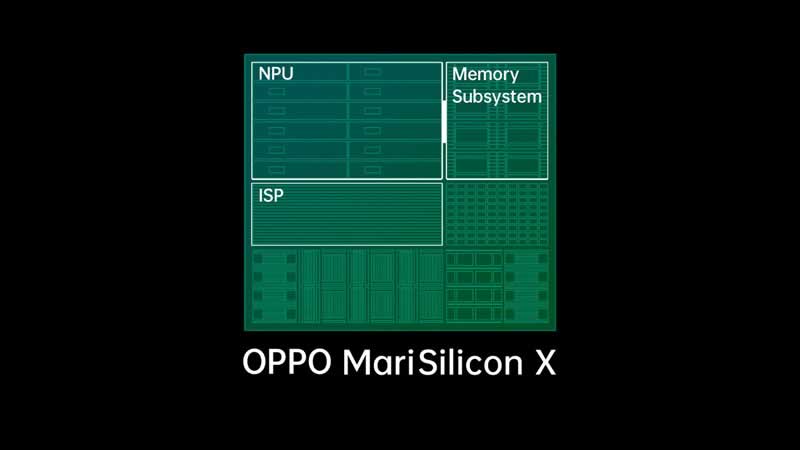
Oppo has presented MariSilicon X — its first NPU (Neural Processing Unit) for state-of-the-art imaging entirely built in-house.

Oppo MariSilicon X features

Made with a 6nm manufacturing process, MariSilicon X combines an advanced neural process, an ISP and a multilevel memory architecture. All this power pack to deliver incredible performance with a truly high energy efficiency that not only makes RAW image processing possible in real time but also 4K and HDR video in night mode via artificial intelligence with live preview.

Oppo MariSilicon X 6nm NPU

At the performance level, the NPU is capable of managing up to 18 trillion operations per second (TOPS), a power that, according to the manufacturer, is more than enough to process all the tasks related to the camera’s artificial intelligence algorithms. The performance is also not limited by the memory of the smartphone since MariSilicon X has a dedicated Tera bps memory.

The ISP included in the MariSilicon X allows you to take photos with a dynamic range of 20 bits at 120 dB, as well as a contrast level of 1,000,000:1, which translates into more realistic images. Noise reduction algorithms based on artificial intelligence are also applied to video, making the results, according to Oppo, clearer and sharper.

MariSilicon X will arrive in the first quarter of 2022 with the Find X series. Apart from the new NPU, Oppo also presented revolutionary OPPO Air Glass.

Android Games Will Arrive On Windows In 2022

Google Play Games on Windows

Google and Microsoft confirms the intentions to combine the two platforms — the Android games coming to Windows PCs in 2022 via Google Play Games.

According to The Verge, Android games available on Google Play Games will be able to run on Windows 10 and Windows 11 starting next year. According to Google, the Play Games app should enable users to play their favorite Android games available on Google Play on a smartphone, tablet or Chromebook under Windows.

The Play Games application should also run on Windows 10. For the implementation, Google does not use Microsoft’s new Android subsystem, with which Android applications can be used natively under Windows 11.

The compatibility of Google games with Windows will also allow synchronization between computers. So the user, as long as he connects with his Google account, can play on his PC and resume the game on his Android mobile or other devices.

How exactly the app is implemented is currently unknown. Apparently, Google doesn’t use Bluestacks’ Android runtime either. According to Google, however, it should not be about cloud gaming, i.e. the transmission of game content via streaming, but a native implementation under Windows.

The integration of Android applications under Windows should be a worthwhile field for Google. For the time being, Microsoft is only cooperating with Amazon to bring Android applications for Windows 11.

How to Open Someone’s Snap Without Them Knowing?

Snap news and stories

If you’re one of Snapchat’s millions of users, you know that the app is designed to send pictures and videos that disappear after a few seconds. While this feature is what makes the app so popular, it can also be a bit of a pain when you want to save or view a snap without the sender knowing. If you’ve ever tried to open a snap without the sender knowing, you may have noticed that it’s not as easy as it seems. 

In this article, we’ll show you how to secretly open snaps without the sender knowing using a simple hack.

Method 1: Using Half Open

If you’re trying to open a snap without the sender knowing, the most common method is opening the Snap in Half Open method. You may see a person’s Snap without them having to be notified if you can snap and slide it to cover the 3/4th section of your screen.

Here’s how to use this method:

  1. Open the snap you want to view in Half Open mode.
  2. Slide the snap to the 3/4th section of your screen.
  3. Hold down on the snap to keep it in place.
  4. While holding down on the snap, use another finger to slide up the home screen and launch Snapchat.
  5. The snap will now be fully open, and you can view it without the sender knowing.

 Method 2: Using Airplane Mode

The sender doesn’t get notified if someone tries to open a snap without them knowing, as long as they’re not connected to the internet with their phone. This is what gives you time to try and open up snaps without being detected by snapping back at the same time as them. This is done by turning airplane mode on and then backing off when you want to open the snap. Doing this will not let the sender know that you’ve opened their snap. 

Here are the steps involved:

  1. Open the snap that you want to see secretly.
  2. Swipe up from the bottom of your screen to open the Control Center.
  3. Tap on the airplane icon to turn on Airplane Mode.
  4. The snap will now open in a private window, so you can view it without the sender knowing.

Method 3: Using a Third-Party App

If you don’t want to install another app on your computer, or if you’re using a mobile device, you can use a third-party app to view snaps secretly. 

Here’s all you need to do:

  1. Download and install an app like Snapbox or SnapCrack on your computer.
  2. Open the app and log in with your Snapchat username and password.
  3. The app will show all of your snaps, including the ones that have been sent to you privately.
  4. Click on any snap to view it privately.

Method 4: Using Spy Apps

If you’re really concerned about someone’s Snapchat activity, spy apps are a reliable way to monitor it. These apps are designed specifically for spying on Snapchat – they’re not third-party applications that also monitor your other social media accounts. 

Here is all you need to do:

  1. Download and install a spy app on the target device (the phone you want to monitor).
  2. Log in with your account credentials. Make sure you have access to the target device’s login details (in the case their device runs on iOS), otherwise the app isn’t going to work!
  3. View all of their snaps in real-time, including sent snaps.

Final Thoughts

As you can see, there are several ways to view snaps privately. Whether you’re using a computer or a mobile device, there’s a method that will work for you. So don’t be afraid to snoop on your friends – just make sure you’re doing it in a responsible way!

WhatsApp Will Soon Enable Making Payments With Cryptocurrencies

WhatsApp Payments With Cryptocurrencies

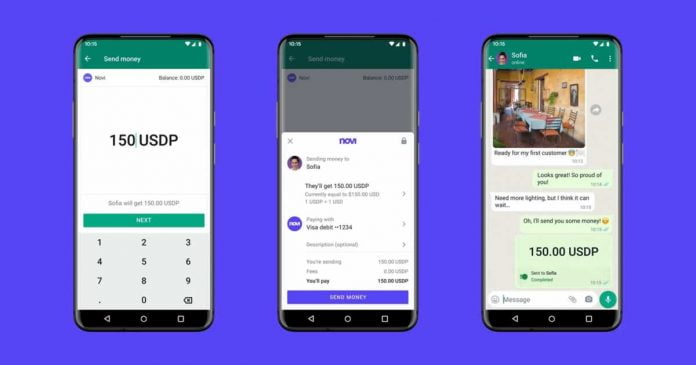
WhatsApp has just announced its first pilot program to allow cryptocurrency payments through the application.

The feature will be available to a limited number of WhatsApp users in the United States. Payments are made with Meta’s digital wallet, Novi, with a stable coin — Pax Dollars (USDP) — whose value is linked to the US dollar.

Stephane Kasriel, head of Novi, has ensured that payments made through WhatsApp are instantaneous and are free of fee. There are also no limits on sending money or a minimum or maximum amount allowed. Furthermore, Novi’s account has no maintenance costs.

https://twitter.com/skasriel/status/1468722859648307201

The company emphasizes that the transactions, being part of the messages, are also end-to-end encrypted. Novi, in addition, ensures that the compatibility with WhatsApp also includes its monitoring service 24 hours a day. This allows you to detect unauthorized or suspicious transactions and reimburse the amount if necessary.

It is not the first time that the messaging app owned by Meta (Facebook) has shown its interest in cryptocurrencies. WhatsApp, in fact, trusted to be able to bring payments through digital currencies thanks to ‘Libra‘ — renamed to ‘Diem’, a digital asset developed by Facebook that never saw the light because of the concerns of different administrations and governments, as well as the rejection of companies such as PayPal o Visa, which initially agreed to collaborate with Mark Zuckerberg’s company. 

Why You Should Have An Instagram Video Downloader App From Savefrom?

Instagram Paid Subscriptions

Instagram is one of the most popular social media platforms to share pictures and videos. It also allows sharing of funny videos and pictures with your friends either on your story or through Direct Message (DM). It happens many times that the account from which you want to share a video is private, but you want to show the video to your friends. If you have an instagram video downloader on your mobile phone or laptop, you can easily download and share the video. You can also share the downloaded video on other platforms like Whatsapp, Facebook, etc.

When considering the Instagram video downloader app, Savefrom.net should be your go-to store. When you download this downloader app from Savefrom, you are getting yourself a worthy deal. The advantages of using Savefrom as your app downloader are listed below. 

Easy Downloading

Savefrom provides the easiest user interface. You do not have to scroll through many pages. There is no fuss created from advertisements. You just go to the website, type in the downloader app you want, and download it with a single click. 

Once you have downloaded the downloader app, it is very easy to use. Go to the settings, make necessary changes and start downloading videos from Instagram.

Free Of Cost

Whenever a website or application store asks for money to download an app, that store loses a potential customer. People usually do not like paying for things that might be available for free somewhere else. Secondly, the payment methods are so lengthy, the procedure so long that people avoid using that website altogether.

The best thing about Savefrom is that you do not have to pay a single penny. There are no hidden charges on apps downloaded from savefrom. You download the apps of your choice free of cost. 

Easy To Use

The applications downloaded from Savefrom are very easy to use. Once the application is downloaded, you just have to open the settings and allow the application to work when needed. 

The downloaded videos are stored in a separate folder. There is no restriction to the number of downloads. You can save as many videos as you like. Secondly, you can change the settings of speed and quality of the video as per your liking. The stored videos can be watched wherever and whenever, even if you have no or limited internet access. 

Additional Options

Savefrom allows you to get a video downloader for any kind of browser you are using. You can download the app either on your smartphone or your laptop and personal computer. There are no restrictions or limitations for the browser. 

Secondly, for an Instagram video downloader, you can also add a chrome extension. This extension allows the easier download of Instagram videos, without having to open the app at all.

Video Downloaders For App Of Your Choice

Apart from the Instagram video downloader app, savefrom offers a wide range of video downloaders for other social media platforms. For example, you can also get a youtube video download apk through savefrom. This android application allows users to download videos from youtube without hassle

You can even download live streaming videos from youtube and share them on Facebook, Twitter, etc. you can also download videos from Twitter, Vimeo, and Facebook using Savefrom.net. 

Bottom Line

Savefrom is a reliable and easy-to-use platform to download app video downloaders. These downloaders are not only easy to use but are free of cost. You can now easily save Instagram videos on your mobile phones and share them or keep them for later use.