Home Blog Page 139

Apple Presents iPad Pro 2022 With M2 Processor

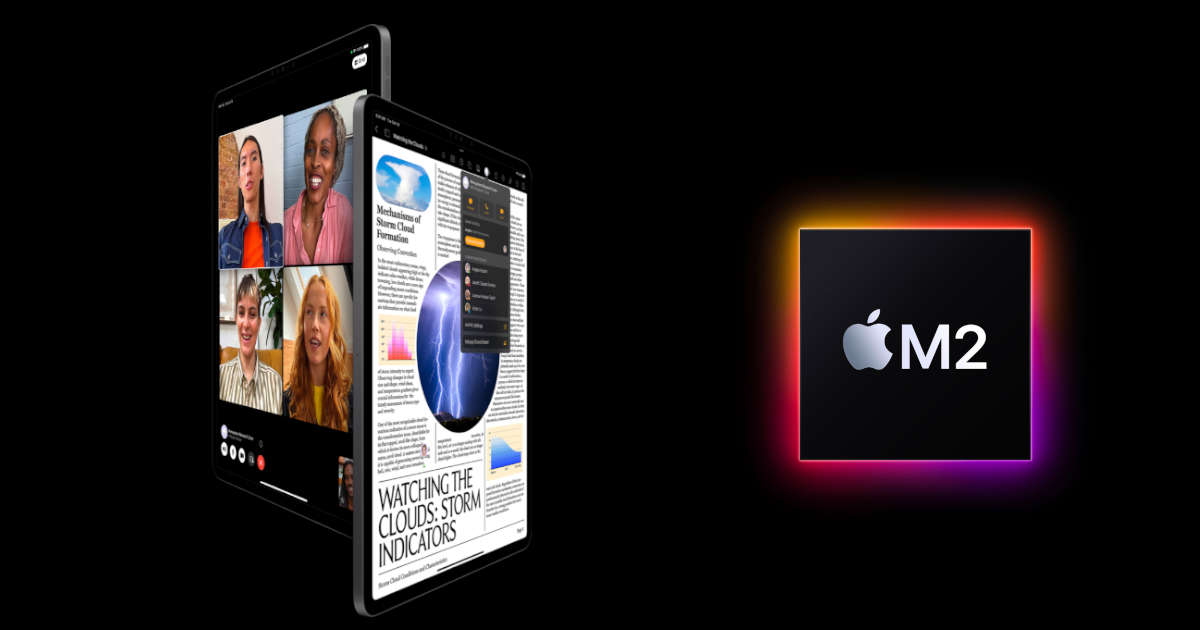
iPad Pro 2022 with Apple M2

After introducing it on board the MacBook rangeApple M2 also makes its official debut on the new iPad Pro 2022. After the last generation, where Apple Silicon SoCs, Apple M1, debuted on tablets for the first time, the new high-end iPads continue this trend that brings them closer and closer to the PC.

The form factor does not change — iPad Pro 2022 is again available in two sizes, 11 ” and 12.9″ in 4:3, based on the most preferred diagonal for use and content creation. 

What changes are mainly the hardware equipment, where Apple M2 has 20 billion transistors compared to the 16 of M1, all thanks to the second generation TSMC 5 nm process. The SoC has an octa-core CPU with up to 15% higher performance, a GPU with 8 to 10 cores, and unified memory of up to 16 GB LPDDR5 with bandwidth ranging from 68 to 100 GB/s.

iPad Pro 2022 Apple M2

In addition to CPU, GPU and memories, the 16-core Neural Engine can perform over 15 billion operations per second, a substantial +40% compared to M1. All this technical facility allows Apple tablets to carry out important operations, for example, to record and transcode ProRes videos up to 3 times faster.

The new iPad Pro, along with iPadOS 16, is said to offer a new feature for the second-generation Apple Pencil. The so-called hover function allows the tablet to recognize the pen up to 12 millimeters above the display. This allows users to preview their marking before making it, which Apple says allows greater precision when sketching and illustrating.

Furthermore, the connectivity department is improved with the introduction of the Wi-Fi 6E modem, with up to 2.4 Gbps in download, and Cellular support with 5G sub-6GHz and mmWave4 is not lacking.

The new 11 and 12.9-inch iPads Pro will be available in the colors silver and space gray and in configurations with 128 GB, 256 GB, 512 GB, 1 TB and, for the first time, also with 2 TB.

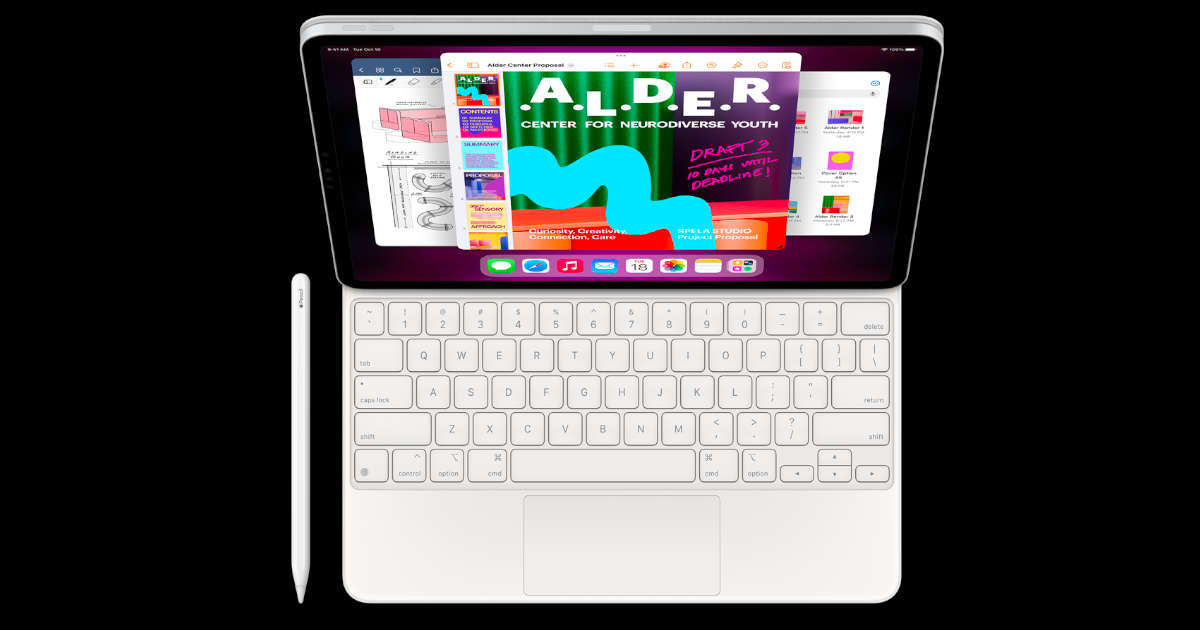
Apple Magic Keyboard

The price list for the 11-inch tablet starts at $799. The 5G model costs from $999. Anyone who wants the 12.9-inch iPad Pro will pay at least $1099 for it. The 5G model is available from $1299. The most expensive model with 2 TB of storage and 5G modem costs $2399.

In addition, a Magic Keyboard in black and white is offered for $299 each for the small iPad Pro and $349 for the large iPad Pro.

The new iPad Pro can be ordered now. It is scheduled to ship and be available in stores from October 26, 2022.

Storage Spaces Direct Overview

Storage Spaces Direct

One of the best features of the Server 2012 R2 are Storage Spaces Direct and Storage Replica. This new virtual block storage technology makes it easy to create redundant data stores for applications like SQL Server, SharePoint, Exchange, and Skype for Business. The primary benefit of the solution is its simplicity; you don’t need to buy a separate physical storage device and attach it to the computer. Rather, you create the virtual storage and manage it directly from the server. 

However, if you’re looking for even more functionality, Storage Spaces Direct is just the beginning. In Windows Server 2012 R2, you have the ability to create more advanced storage options through Storage Spaces. For instance, you can create either virtual disks in the hyper converged infrastructure appliance or volumes and dynamically expand them. If that’s not enough, you can even use Microsoft’s Volume Shadow Copy Service to back up and protect your data.

What’s Special About Storage Space Direct

Storage Spaces Direct is a highly scalable storage virtualization feature in Windows Server 2012 and Windows Server 2012 R2. It takes advantage of clustered file systems and delivers a simple and easy-to-use storage resource pooling technology. It creates an easy way to combine, store, and access data from multiple devices on your PC. Storage Spaces Direct is an all-in-one storage solution that simplifies and extends file access and storage for personal and business users.

Here are some of the benefits that you get when employing it on your side:

  • Create new virtual storage spaces;
  • Add data to existing storage spaces;
  • Replace hard drives and add more capacity;
  • Install and run the software on existing disk resources;
  • Use as a boot volume to launch the Desktop on your new storage;
  • Configure Storage Spaces Direct without a system reboot;
  • Use the new storage as a Windows File History disk;
  • Use the new storage as Windows Virtual Hard Drive (VHD);
  • Simplify the installation process by allowing Windows to do the work for you.

You can even span across Hyper-V VMs and physical machines without using a third-party storage management solution. All virtual machines and physical machines that will consume this pool have to be added to the pool by their respective storage administrators. The latter has to ensure that the storage pool capacity for a VM or physical machine is greater than the combined capacity of all the VHD files for the virtual or physical machine.

Storage Spaces

The beauty of Storage Spaces Direct is that it takes care of the pooling for you. The management of the VHD files inside the pools is invisible to the virtual machines. Instead of having a single drive or volume for virtual machines, you can build multiple drives or volumes, and each of these can be stored in separate pools. Thus, they will not consume any additional physical disk space when a virtual machine creates a new VHD file. You can take any number of storage pools, and you can scale your capacity to as many VHD files as you need without worrying about growing your pools. This is true for Hyper-V VMs and physical machines.

Another great feature of Storage Spaces Direct is that if the host machine is shut down or rebooted, the storage pool will be backed up. In a real-world scenario, this means that you have a unified pool of VHD files with all your virtual machines or physical machines. And these VHD files are backed up to a backup media, such as a tape, disk, an external USB drive or public cloud. If the host machine is rebooted, the backup of the VHD files will be restored to a new pool. However, this doesn’t create any additional data protection on top of the standard backup you have do to an external drive, tape or cloud. It enables you to create a single pool of VHD files with everything inside.

If the host machine is shut down, the pool will also have to be taken down. Once the host machine is back up, the storage pool is brought back online, and all VHD files are resized to fit the space that they consumed before the shutdown. The newly-created VHD files in the new pool will be assigned to the virtual machine that is still running in the host. In case the virtual machine was already terminated by the storage administrator, then the new VHD files will be given to the virtual machine that has a higher priority. However, all of this depends on your redundancy (RAID) configuration.

Final Say!

Storage Spaces Direct is a virtualization technology that can be used to run multiple operating systems within a single storage environment. In other words, Storage Spaces Direct creates a single virtual storage pool that has the capacity of many different storage volumes. If a volume is no longer in use, the storage space can be repurposed as per your needs. Storage Spaces Direct also supports dynamic volumes, which means that if a volume fails, the data on the volume will be automatically migrated to other volumes that are available. Storagewise, Storage Spaces Direct works like a disk. The solution makes your IT infrastructure more scalable, flexible, and secure than just having a storage array or several.

Spotify HiFi Will Arrive With A ‘Platinum’ Plan: Twice As Expensive As The Premium Plan

Spotify HiFi Platinum Plan

Spotify is already testing some of its users for the launch of a new subscription plan, which would cost twice the basic plan but would have significant advantages over the rest.

More than a year and a half ago, Spotify jumped on the high-definition bandwagon with the announcement of Spotify HiFi, a new mode that will offer the highest sound quality on the platform to date. However, the announcement did not actually follow the release of the new subscription plan, and to date, the company has not yet released any type of Spotify plan with lossless high-quality audio streaming.

Now it looks like Spotify with HiFi quality seems to really exist, but it could be called Platinum.

This is what emerges from a survey carried out by the company to a user who had cancelled his Spotify subscription and switched to Apple Music and who was offered a decidedly different subscription option from what is currently present in the Spotify catalog. A new Spotify plan that is twice as expensive as the Premium version offered by the platform.

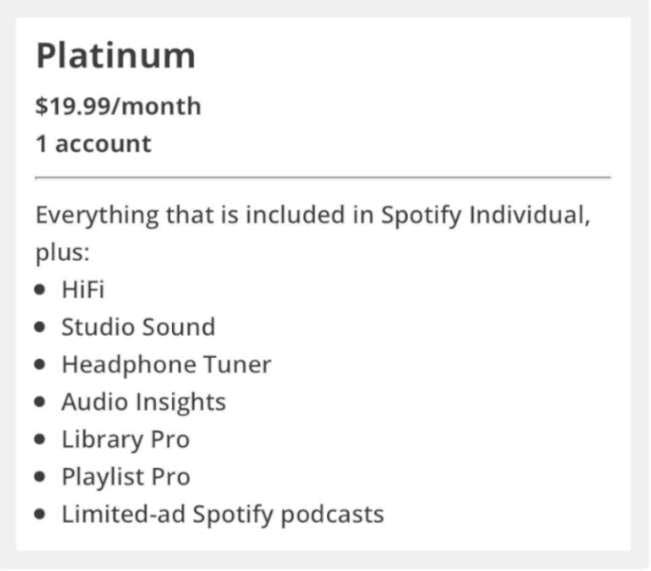
According to the Reddit user, who claims to have received a survey asking if he would upgrade from his current subscription to a “Platinum” one, which includes more benefits beyond lossless audio.

Spotify HiFi Platinum Plan details

By default, Spotify’s paid subscription costs $9.99 in the US. The Platinum subscription mentioned in the survey would cost $19.99. The music would be in high resolution, and additional functions for the music library and playlists are mentioned but not described in detail.

In addition, there could be special adjustments for the use of headphones. There would also be access to Spotify’s own podcasts, which would be advertised. Spotify does not provide any further information on this either.

Spotify has not yet confirmed the future availability of this Platinum plan with HiFi, but the Reddit user claims that the survey asks if he would be willing to upgrade to this subscription “within the next 30 days.” As a result, Spotify HiFi is expected to be announced during the month of November.

Edge: Razer Introduces Android Handheld Game Console For Cloud Gaming

Razer Edge

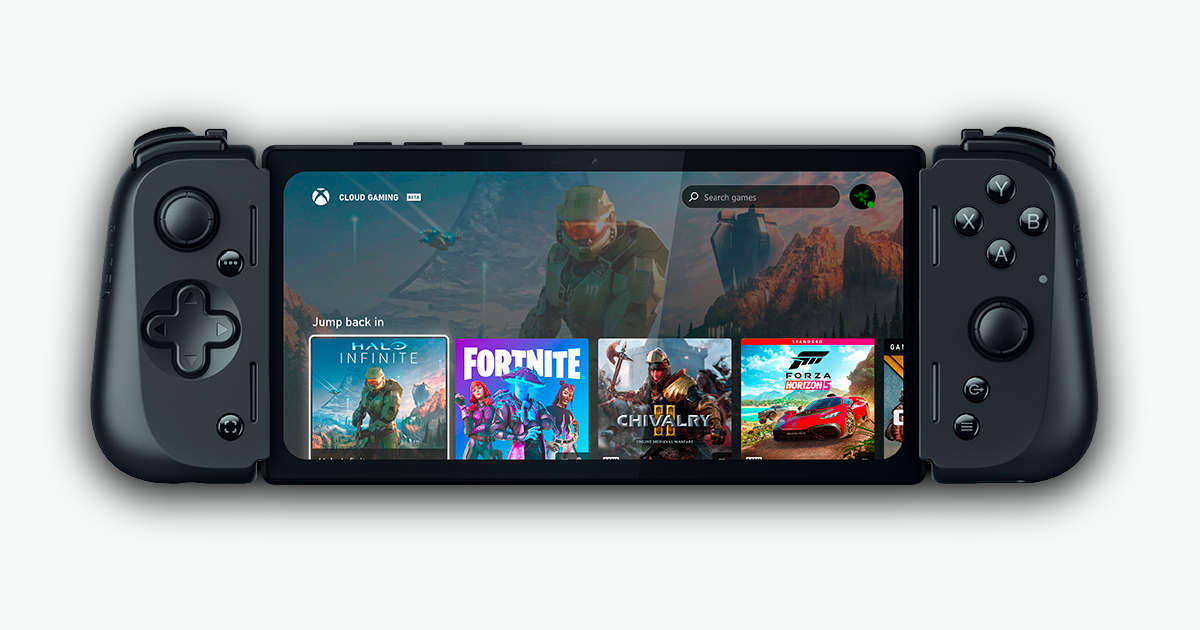
Razer has unveiled its first handheld gaming console, the Edge — built on the Qualcomm platform and runs on Android. It is intended primarily for use with streaming cloud gaming services like Xbox Cloud Gaming or NVIDIA GeForce Now.

The device consists of a base unit with a 6.8-inch AMOLED screen, which is inserted into the Kishi V2 Pro gamepad. The display has a resolution of 2,400 x 1,080 pixels and an unusually high frame rate of 144 Hz for a device in this class.

Razer Edge for cloud gaming

The “heart” of the Razer Edge is the Snapdragon G3x Gen 1 — a special version of the Qualcomm chip designed specifically for portable consoles. The amount of RAM is 8 GB (LPDDR5), and the built-in memory is 128 GB (UFS 3.1)— it can be expanded via MicroSD.

The battery has a capacity of 5,000 mAh. Razer has not yet announced how long you can play with it. Also, the Razer Edge houses a camera on the front with 5 MP so that videos can be recorded in 1080p with 60 fps.

The handheld appears in two versions — one variant only offers WLAN (6E), and the price should be around $400. Alternatively, there should be a model with 5G — what that will cost is not yet known. This model is also the first on the market with the ability to connect to 5G mobile networks.

Razer plans to release the Android 12-based Edge in the US in spring 2023.

Manufacturers are now focusing more and more on devices that support cloud gaming services. Google recently launched Chromebooks dedicated to cloud gaming. Although, the most important competitor for the Razer Edge is likely to be the Logitech G Cloud.

Google Launches Maps And Search App Widgets For iOS 16 Lock Screen

Google Maps and Search App Widgets For iOS 16 Lock Screen

Google Maps and Google Search applications are now compatible with iOS 16‘s new functionality that shows widgets on the lock screen.

Google has made six applications compatible with lock screen widgets, this time for iOS, including Gmail, News, Drive, and Chrome, with the support of Google Maps and Google Search apps.

Google Maps

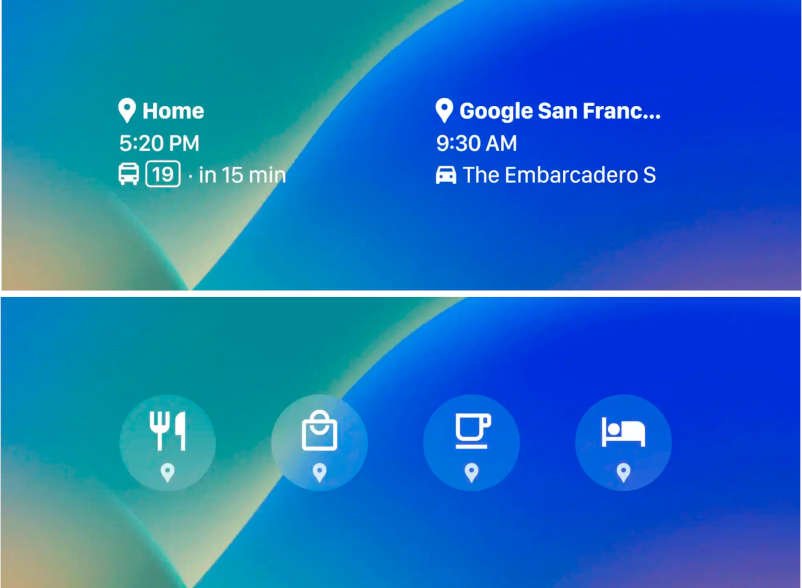
Google Maps App Widgets For iOS 16 Lock Screen

In version 6.40, the Google Maps app now supports iOS 16 lock screen widgets.

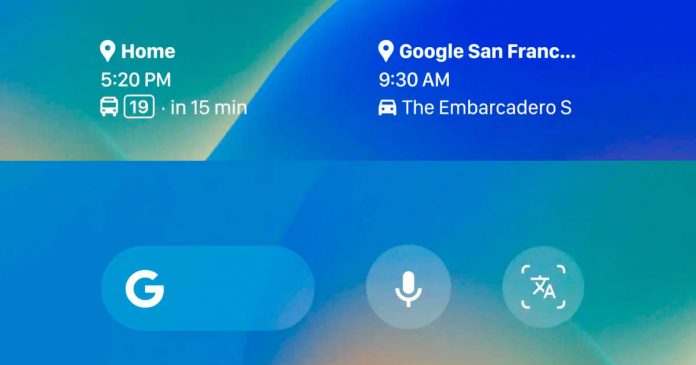
There are two types of widgets.
• Regularly used routes: You may look for information on frequently used routes and see when they are expected to arrive.
• Search: The Google Maps app allows you to search for restaurants, petrol stations, and other locations.

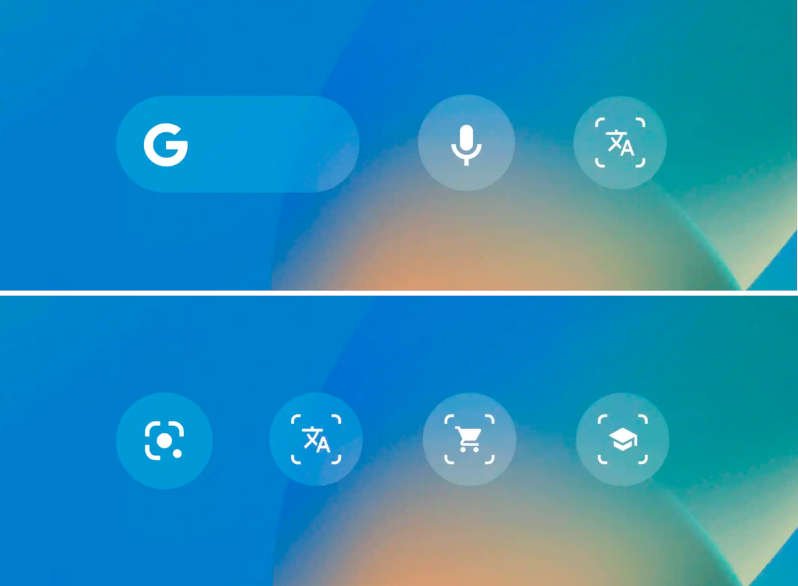
Google Search App Widgets For iOS 16 Lock Screen

A total of 4 types of widgets for the Google Search app are available (large/small search size, voice search, lens, and lens shortcut).

• Search: From the lock screen, you may access Google Search.
• Voice Search: Ask questions, hum, or search for information with your voice.
• Lens: You may search for images or cameras.
• Lens Shortcuts: Quick access to your preferred lens functions. Make use of your camera for translation, shopping, and homework assistance.

These Google Search Lock Screen widgets are ideal for replacing Siri. Maps and Search are the first Google applications to support iOS 16 Lock Screen widgets, joining Gmail, News, Drive, and Chrome.

If you don’t open each application after upgrading before heading to the Lock Screen editor to add them, they won’t display.

Google Announced Translation Hub

Google cloud news and stories

Google has announced “Translation Hub”, an automatic translation service that supports files created with PDF and Microsoft Office. 

Translation Hub is provided as part of Google’s cloud computing service, “Google Cloud”, and can translate documents in just a few clicks. One-click translation into 135 languages ​​​​based on Google’s neural machine translation. 

Translation Hub preserves the design and formatting of the original document, so the translated document has the same look and feel as the original document.

Translation Hub was developed with complex enterprise translations in mind. Translation Hub allows central administrators to easily manage multiple portal configurations for different departments. Maintain common translation glossaries, translation memories, and independent billing and chargebacks used by different departments. Translation Hub also offers complete data encryption and is not used or accessed by Google for any purpose.

Translation Hub pricing

Translation Hub has two price tiers, the Basic tier and the Preview Advanced tier.

FunctionBasicAdvanced
Administrative controls through the Google Cloud ConsoleYesYes
PDF, DOCX, and PPTX translationYesYes
Google Docs and SlidesYesYes
Translation templatesYesYes
Glossary supportYesYes
Translation memoryNoYes
Support for AutoML Translation models (custom models)NoYes
Post-editing support for machine translated contentNoYes
Machine Translation Quality Prediction (MTQP) ScoreNoYes
100+ language supportYesYes

The prices are as follows.

TierPrice
Basic$0.15 per page
Advanced$0.50 per page

Quotas and limits

Translation Hub applies the following quotas to projects: Request an increase to change the quota.

AllocationValue
Number of portals in Translation Hub1,000
Concurrent number of translation jobsUnlimited
Pages translated per minuteUnlimited

Translation Hub enforces the following usage limits:

Usage limitValue
PDF Translation Request300 pages per file
DOCX and PPTX translation requests20MB per file
Import Docs and Slides files from Drive10MB per file
CSV file size for importing users in bulk100KB or 500 rows per import

Most Helpful and Perspective Technological Tools to Use in the Classroom

Perspective Technological Tools

Technological progress has improved every aspect of our life, including how we study. It is known to be expensive and feared as addictive, but the amount of comfort and benefits they bring is worth all the investment and adjustments you make to digitalize your classroom activities. 

Using technology in the classroom can boost student engagement and collaboration, connect students with authentic audiences, and offer actionable data to teachers. Here are some of the most widespread technological tools and devices used in modern classrooms. Who knows, maybe you will decide to adopt some of them into your study process.

Learning apps

Several different applications are available for teachers to use to enhance the learning process. Some are designed for specific instructional goals, while others are more general. In any case, teachers should ensure they choose the right apps for their students. The right apps should help students develop their skills and improve their understanding of complex topics.

Tech tools can help teachers gather detailed data about student progress and learning habits to design more relevant learning approaches and build stronger relationships with students. The right technology should empower students and help teachers understand them better rather than dividing them. Motivated students are more likely to be thorough in their assignments. They will be interested in doing them all alone without relying on any external essay writer free online, so make sure to use technology to get to know your students’ preferences and learning styles.

Specialized learning apps allow students and teachers to work together in connected learning communities. They can record short videos and respond to other students’ work in real time. This makes it easy to share work and fun for all involved. These apps can also be used as a tool for peer assessment, and students can use them to archive completed work.

Learning management systems

Learning management systems (LMS) are a great way to keep all your class materials in one place. Using an LMS, you can assign different types of work to your students and organize them in a centralized space. A good LMS also allows you to set various tests and assignments and grade them automatically.

A learning management system also allows instructors and students to communicate and exchange assessments and feedback online. This allows you to make the assessment process transparent and fair. The feedback can also help students focus their efforts. The system also offers document management, which lets students upload course materials and teachers manage the relevant curriculum. By enabling collaboration between students and instructors, you can increase their engagement.

Another great benefit of an LMS is that it allows students to communicate with their teachers and classmates. For example, a student can post a question or a comment to an instructor or other student. An LMS also allows teachers to post important events and dates, such as tests. It also features a built-in reward system, such as badges, reinforcing good behavior.

Interactive whiteboards

Interactive whiteboards are a versatile classroom technology that can help teachers engage students in the discussion and solve problems. They can connect to a local or online network and can also use multimedia content. This allows teachers to share resources and lesson plans with their students and allow remote students to participate in real-time. These features are particularly useful when students need to do research or work on a problem together.

Most interactive whiteboards use a stylus or finger to manipulate the information displayed. This allows students to change and manipulate what they see and eliminates the need for erasing. They can also write notes and draw over them using a finger, which aids learning.

Using an interactive whiteboard in the classroom can make learning engaging for every student. For example, a math lesson can incorporate an equation that students need to solve, and they can then compare their answers to the answers of others to understand where they went wrong. This helps students retain information and also helps them understand concepts better.

Virtual reality

The use of virtual reality (VR) in education is increasing as many teachers see the benefits. However, some educators are hesitant to integrate the technology into their curriculums, citing concerns ranging from high costs to push back from administrators. Others see VR and AR as mere entertainment and not practical teaching tools. They also worry about bulky equipment and potential glitches or quality issues. Regardless of the hesitation, the demand for VR in the classroom is expected to increase over the next few years.

One of the benefits of VR is that it can allow students to experience different locations worldwide. They can learn about different formations of the earth and coastal erosion in a hands-on way. They can also explore the human body using certain software and identify different organs. Many other subjects, including STEM (science, technology, engineering, and math), can be taught using VR.

Another potential benefit of VR in the classroom is the ability to increase student engagement. It is particularly effective in schools with a high percentage of students who have trouble focusing on their studies. This technology can help such students by enabling them to communicate freely with their classmates.